Amazon Keyword Search: A Practical Research Workflow for POD
You publish a new POD design, optimize the title, add a few tags, and wait. Days pass. Then weeks. The analytics dashboard stays flat, and you're left wondering whether the design missed the market or whether shoppers just never found it.
That's where Amazon keyword search earns its place. For POD, keyword research isn't a hunt for the biggest phrase available. It's the process of matching the language buyers type with a design, audience, occasion, and product that make sense together.
Table of Contents
- Why Amazon Keyword Search Matters for POD Sellers
- Three Free Ways to Surface Real Demand
- Reading Competition Signals in the Search Results
- Using Trendlytic Reports to Validate a Niche
- Prioritizing Long-Tail Phrases Over Volume Alone
- Tracking Changes and Protecting Your Account
- A Realistic Workflow and What Comes Next
Why Amazon Keyword Search Matters for POD Sellers
A design can look right on a shirt mockup and still attract no useful impressions. The problem may sit in the words around it. If shoppers do not type the phrases used in the listing, Amazon has limited evidence that the product belongs in those searches. The same applies to hoodies, mugs, and other design-led products. Artwork can communicate an idea to a person immediately, while Amazon still needs language describing the subject, audience, and intended use.
Amazon search is crowded and concentrated. An independent 2026 summary reports 5.94 billion monthly search queries, with the top three results receiving 72% of clicks and the top 10 sellers capturing 55% of search traffic for their most popular keywords. It also reports that 78% of Amazon keyword searches contain four or more words. Amazon search statistics offer useful context, but I treat independent estimates as directional rather than exact.
For a POD seller, keyword research works best as a validation loop across three signals: autocomplete, the results page, and shopper behavior. Autocomplete shows language Amazon connects with active search paths. The results page reveals which products and audiences Amazon considers relevant. Clicks, conversions, and related search data show whether that language leads to meaningful shopping activity. A tool such as Trendlytic can compress these checks into one workflow, but it cannot decide whether a phrase fits the design.
Match the buyer's wording
Translate the design idea into the way a buyer would shop. “Funny gift for a nurse practitioner” gives Amazon an audience, occasion, and style. “Funny shirt” is broad enough to attract unrelated products and much tougher competition.
Long-tail phrases often provide clearer intent because they contain more context. A shopper naming a profession, recipient, occasion, and style has given you several checks for product fit. Review those details before building the listing, not after uploading the artwork.
Amazon's native Search Terms report reflects the same shift toward query-level evaluation. For brand-registered sellers, Amazon describes a report covering popular search terms, search frequency rank, the top three clicked products, click share, and conversion share. This explanation of Amazon keyword search volume explains why search frequency rank and behavioral signals can be more useful than an assumed volume figure alone.
Practical rule: Research the phrase before designing around it. Changing a concept is cheap at the sketch stage and expensive after you have built a listing, uploaded assets, and committed to a niche.
Compliance belongs in that first review. Amazon restricts terms including brand names, ASINs, profanity, temporary claims, and subjective claims in search terms. Keep this guide to restricted keywords for sellers nearby while compiling and checking a keyword list.
Three Free Ways to Surface Real Demand
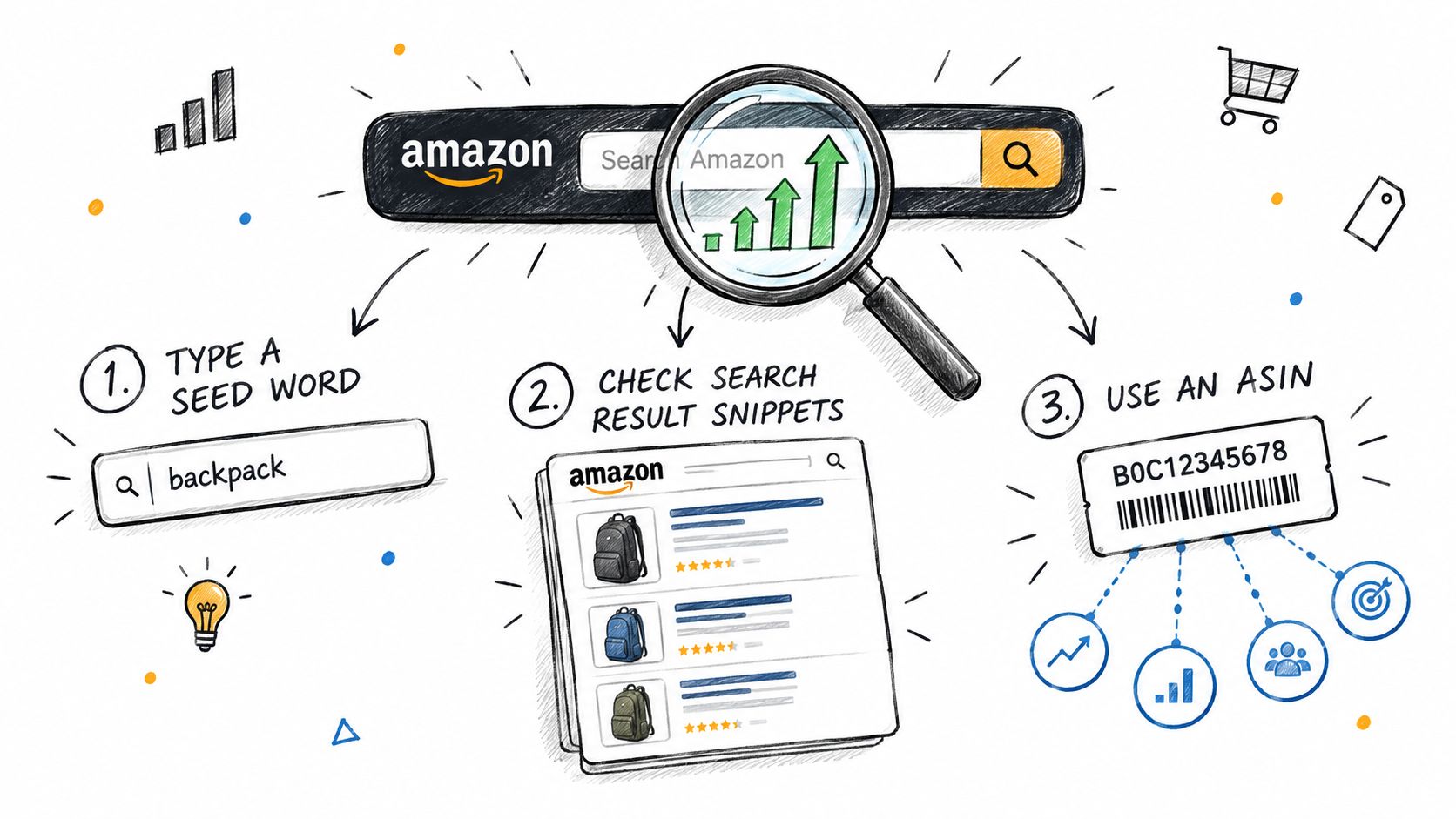
I use three free inputs before trusting any keyword list: autocomplete, the search results page, and reverse ASIN research. Each answers a different question. Autocomplete reveals language Amazon associates with shopper activity. The results page shows what Amazon believes belongs there. Reverse ASIN research exposes the terms an existing listing may already be indexed for.
Begin with autocomplete in an incognito browser. Set the marketplace and region first, because regional settings can change suggestions. For consistent research, use a US marketplace view and avoid staying logged in, since personalization and previous searches can skew what appears.
Type a seed such as “cat mom,” “retirement gift,” or “nurse practitioner” into the Amazon search bar. Record the suggestions that fit your product, including unusual combinations. Don't treat the list as a volume report, but do treat it as evidence that Amazon recognizes those phrases as meaningful search paths.
Read the page Amazon returns
Search each phrase exactly and study page one. Record the visible result count, the presence of Sponsored Products, the dominant product types, and the brands appearing repeatedly. Also, check whether the products match the phrase. A gift query that returns mugs, books, tote bags, and apparel may have demand, but it may not be a clean fit for your shirt.
Look for visual consistency, too. If nearly every result uses the same design treatment, color palette, and audience language, you're looking at a crowded interpretation of the niche. If the page contains several distinct sub-angles, you may have room to select a sharper one.
Use reverse ASIN research
Choose a competitor that appears relevant and copy its ASIN into a reverse lookup tool. A free lookup service can help, and Trendlytic's basic reverse field is another option when you want to gather terms from an existing listing rather than brainstorm from scratch.
Separate the harvested terms into three groups:
- Primary phrases: Terms that describe the buyer, product, or occasion directly.
- Supporting language: Synonyms, alternate names, and related descriptors.
- Poor matches: Terms that attract a different product type or audience.
Amazon recommends a workflow of keyword research, keyword placement, and ongoing performance monitoring in its seller guidance on Amazon keyword research. That sequence matters. A phrase found in autocomplete still needs to survive a relevance check, a SERP check, and later performance review.
The manual process is valuable because it teaches you how the marketplace behaves. It's also slow once you're comparing several niches and competitors. That's where a report can compress the collection stage, provided you still inspect the underlying results.
Reading Competition Signals in the Search Results
A result count can tell you how many pages Amazon has indexed, but it doesn't tell you whether you can compete. I care more about the strength and consistency of the listings occupying page one.
Start by recording the number of results, then look at the first visible products. Note whether they're Merch on Demand, FBA, or other marketplace listings, and check the review counts on the leading ASINs. Review counts aren't a perfect proxy for sales, but they help reveal whether a phrase is controlled by established products or populated by relatively young listings.
An apparently smaller result set can be harder than a larger one. A page with a few thousand results dominated by a recognizable brand and heavily reviewed ASINs may offer less practical room than a broader page where the top products have modest review histories and inconsistent positioning.
Log the page instead of guessing
| Signal | Where to Find It | What It Tells You |
|---|---|---|
| Total result count | Search results page | The size of the indexed field, not its actual difficulty |
| Sponsored placement | Top row and product carousels | Whether advertisers are competing aggressively for the query |
| Review strength | First three to five listings | How much accumulated trust leading products may have |
| Exact-phrase matches | Titles, bullets, and product descriptions | Whether the query has a focused result set |
| Product-type mix | Main results grid | Whether shoppers are seeing apparel, gifts, books, or unrelated products |
| Seller repetition | Repeated brands or storefronts | Whether one operator is occupying several positions |
| Category placement | Competitor listing details | A rough indication of product traction and market fit |
A useful example is a phrase returning 8,000 results while its top three listings each have fewer than 200 reviews, compared with a phrase returning 2,000 results where a dominant brand's ASINs each have 10,000 reviews. The first page may be more approachable despite the larger result count. Those figures are illustrative scenarios, not marketplace benchmarks.
Watch for cannibalization. If several listings from the same seller appear for nearly identical designs, that seller may be dividing its own demand across products. It also tells you that the niche has already attracted systematic testing, so you'll need a distinct angle rather than another close copy.
BSR can add another layer. Open competitor listings and inspect their category placement and rank information where available. You won't get a clean sales forecast from that alone, but you can form a baseline view of whether the products are moving consistently or only occupying a relevant page.
My rule is simple: if the top three listings all exceed 1,000 reviews and are controlled by established or brand-gated sellers, I treat the phrase as contested regardless of how attractive the design idea looks.
Using Trendlytic Reports to Validate a Niche
Manual research teaches judgment, but it becomes repetitive when you're checking several POD ideas. Trendlytic is one option for compressing the loop. It covers TeePublic, Amazon Merch, Redbubble, and Etsy, and combines live marketplace research with related keywords, seller information, and a built-in USPTO trademark check.
For a phrase such as “cat mom wine lover,” I'd use a report as a screening document, not a final verdict. I'd inspect the competition score, the average BSR context for shirts in the bucket, related phrases, and the direction of the trend curve. Trendlytic describes its reports as combining autocomplete data, BSR history, niche scoring, and validated designs, with the manual process compressed into roughly 40 seconds according to the publisher's product information.

Interpret the report with restraint
A high opportunity score doesn't mean a design will sell. It may reflect a favorable mix of demand and competition in the data available at the time, while missing factors such as weak design quality, poor sizing, bad mockups, or a phrase that shoppers use but rarely purchase.
A rising trend curve can also be seasonal or event-driven. I want to know whether the phrase describes a durable audience or a temporary spike. Related phrases are useful for finding adjacent concepts, but I still search each candidate manually and inspect the page-one product mix.
The second step is essential. Before drawing, run every candidate phrase through the USPTO trademark database, including variations that appear harmless. A clean result doesn't guarantee that Amazon's Brand Registry won't flag the phrase, and trademark records can change after your initial research.
Amazon's Generic Keyword guidance says the backend field is used for lexical matching between an ASIN and a query and is limited to less than 250 bytes. It also recommends synonyms, abbreviations, and alternative product names, so use that space to broaden relevant discovery rather than repeat the title. Amazon's Generic Keyword instructions explain the field's purpose and constraints.
Trendlytic can reduce the time spent gathering signals across marketplaces, but it doesn't replace the page-one inspection or the trademark decision. The report is a shortlist generator. Your judgment decides which phrase deserves a design.
Prioritizing Long-Tail Phrases Over Volume Alone
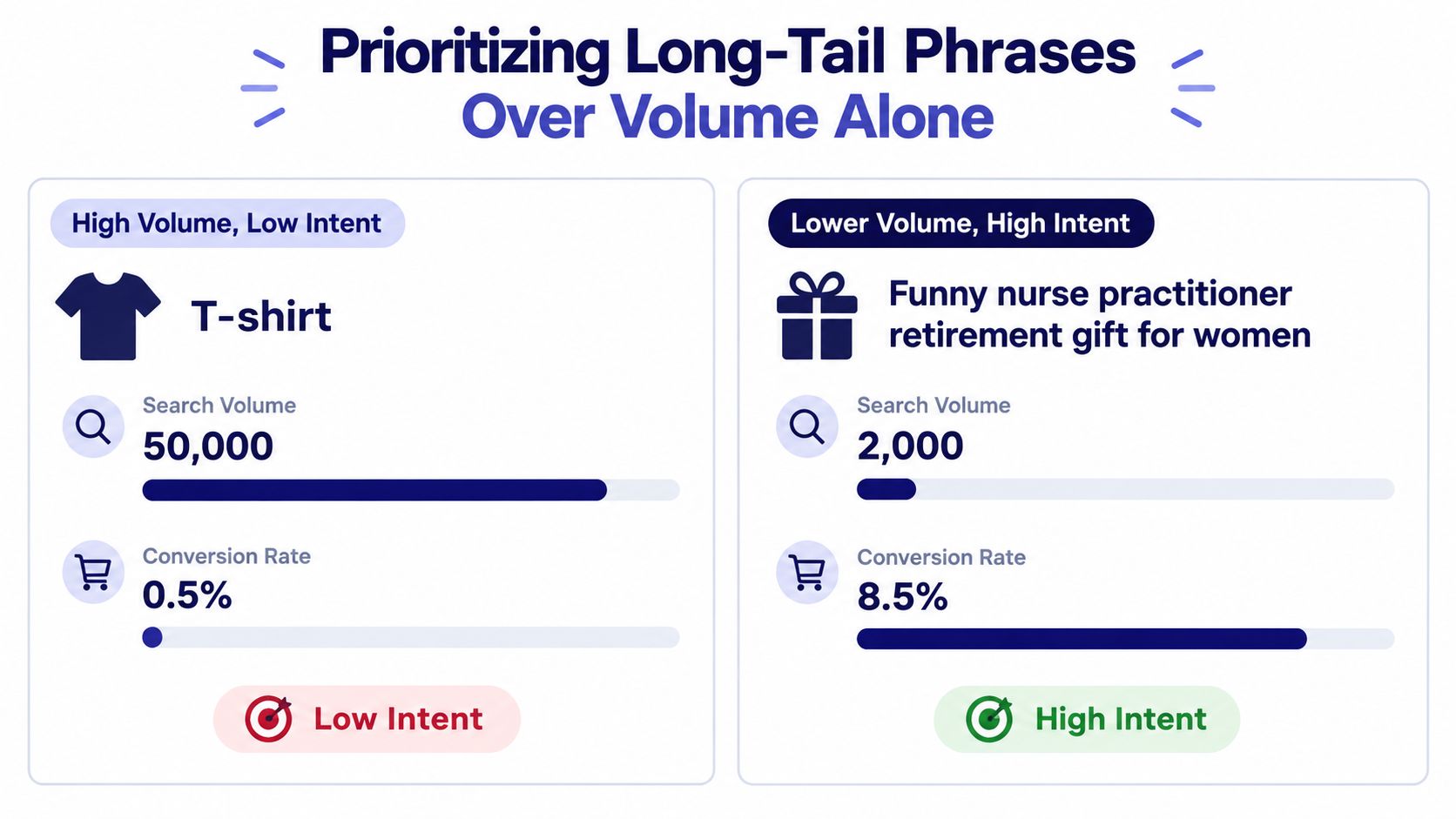
A large audience is not automatically a useful starting point for POD. “T-shirt” identifies a category, but gives little direction about the buyer, occasion, or design. “Funny nurse practitioner retirement gift for women” gives a defined audience, event, and creative brief.
That difference changes how I validate a phrase. A broad apparel query can mix styles, recipients, and buying situations across the results. A specific retirement-gift query may show a tighter product group, making it easier to judge whether one design belongs there. The narrower phrase may attract fewer searches, yet its intent can fit the listing more closely.
Measure concentration by hand
The concentration figures cited earlier, 72% of clicks going to the top three results and 78% of queries containing four or more words, support a practical approach. Treat Amazon keyword search as a validation loop: use autocomplete to collect language, inspect the results to test relevance, then consider shopper behavior before choosing a phrase. The point is not to accept a volume estimate. It is to find a query that produces a coherent buying page.
Search the phrase and inspect the first 16 results. Ask:
- Do most products target the same audience or occasion?
- Do the listings share a clear product type?
- Are independent designs visible, or do major brands dominate?
- Can one specific design fit naturally among the leading products?
If more than half the visible results belong to unrelated categories or large brands, I usually reject the phrase for a new POD launch. That mismatch suggests Amazon is interpreting the query differently from the intended buyer, even if the estimate appears attractive.
Autocomplete, results, and behavior each answer a different question. Trendlytic can compress the collection of related phrases and marketplace signals, while long-tail keyword research for POD provides another way to examine the balance between specificity and reach. Neither replaces opening the page, reading the offers, and deciding whether shoppers appear to be buying for the reason the phrase suggests.
A workable long-tail phrase should point toward one design without becoming so narrow that natural shopper language disappears. I also check the words before adding them to a listing. Amazon's search-term policy prohibits brand names, ASINs, profanity, offensive wording, temporary claims such as “new,” and subjective claims such as “best” or “amazing.” Amazon's search-term rules show why extra terms do not automatically create extra reach. Relevance and compliant wording matter more than filling every available field.
Tracking Changes and Protecting Your Account
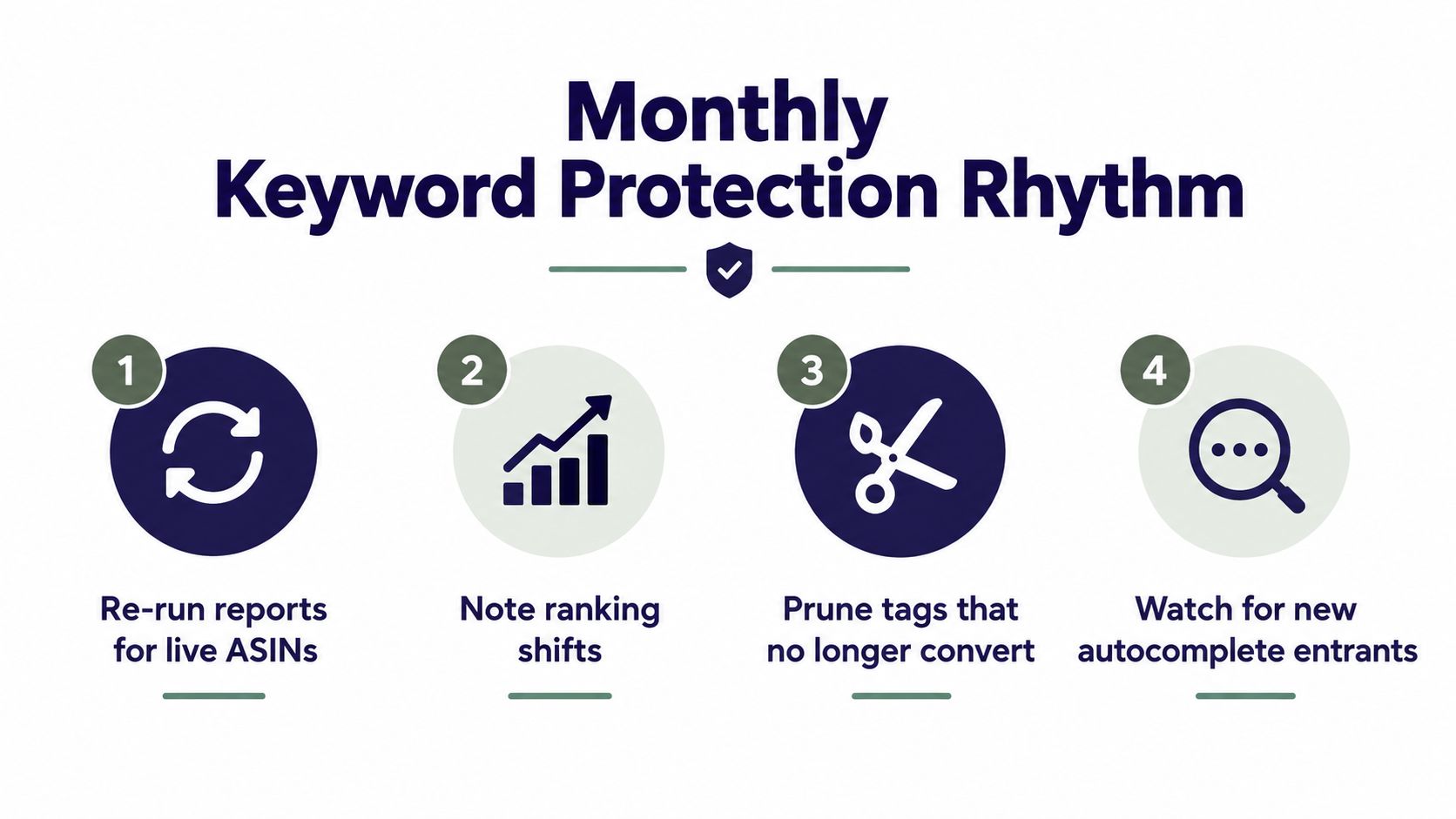
Keyword research becomes useful only after you revisit it. I keep a monthly review that fits around live listings rather than treating the first report as permanent. For each ASIN, I check whether the target phrase still describes the page, whether competitors have changed, and whether new autocomplete suggestions reveal a stronger variation.
A simple record is enough:
- Refresh live reports: Recheck the niches and ASINs that matter.
- Note ranking shifts: Record movement, new page-one entrants, and changes in product mix.
- Prune weak tags: Remove terms that attract impressions without useful engagement or purchases.
- Watch autocomplete: Add relevant new language to the research backlog.
Keep evidence, not just opinions
Save dated notes for each decision. I record the exact phrase, the marketplace, the search context, the leading competitors, and the trademark result. I also screenshot competitor listings before they change, especially when a design's positioning influences my own product decision.
Seasonality deserves its own note. A phrase that weakens outside an occasion may still be worth reactivating later, but I don't want to mistake a seasonal pause for permanent failure. A report history lets me compare the same niche over time rather than rebuilding the research from memory.
Account protection needs a broader lens than autocomplete. Flag designs connected to a university, sports league, entertainment franchise, famous character, or recognizable brand even when Amazon suggestions include the phrase. If a phrase that looked clean returns a USPTO hit later, pause new work, save the updated record, and review existing listings before making changes.
I'd also set up Brand Registry monitoring and keep documentation organized in case a listing is challenged. The Merch by Amazon trademark protection guide is a useful reference for building that habit, but no tool can make a risky phrase safe.
Tracking without action is just journaling. Each monthly review should end with a decision, keep the phrase, revise the listing, test a related term, or stop pursuing the niche.
A Realistic Workflow and What Comes Next
The complete process is manageable when you keep the stages separate:
- Search autocomplete for buyer language.
- Read the results page for relevance and crowding.
- Use a report to compare related phrases and marketplace signals.
- Check each candidate with USPTO records.
- Build a small list of phrases for the listing.
- Recheck live ASINs on a regular schedule.
Amazon keyword search can't guarantee sales. A relevant phrase may still fail because the design is weak, the thumbnail blends into the page, the product choice is wrong, or shoppers prefer another interpretation. Search rank also tends to move gradually, so I avoid judging a listing from a short burst of impressions.
The practical target is a defensible shortlist. I'd document three niches per week, noting competition density, BSR movement, product fit, related phrases, and trademark risk. That creates a research archive you can return to when a seasonal opportunity appears, instead of forcing every launch to begin with a blank spreadsheet.
A tool can reduce collection time, but it can't decide whether a joke works, whether a phrase sounds natural, or whether the design has enough distinction to earn a click. The keyword research process for POD is most useful when it supports those decisions rather than pretending to make them for you.
The quiet advantage is restraint. Skip phrases that are legally uncertain, visually overcrowded, or too broad to guide a design. Keep the terms that match a real buyer, a clear product, and a page where your listing has a credible reason to exist.
Trendlytic brings together Amazon Merch keyword research, live POD marketplace signals, related phrases, and trademark screening in one place, so you can shorten the manual validation loop without removing the judgment behind it. Visit Trendlytic if you want to document and compare your next POD niches with more structure.