How to Find Related Keywords That Actually Move Sales
You've got a promising POD idea, but the search bar keeps giving you phrases that seem almost identical. You type “cat dad,” then “funny nurse t-shirt,” and suddenly you're staring at autocomplete suggestions, marketplace listings, and unrelated products with no clear way to decide what deserves a design.
That confusion is normal. Related keywords aren't just synonyms. They reveal different buyer intents, product angles, and levels of competition. A practical workflow combines classic SEO expansion with marketplace validation, then checks whether the phrase is safe to use before you invest time in artwork.
Table of Contents
- Why Related Keywords Matter More Than Your Seed Term
- Free Ways to Discover Related Keywords
- Comparing Free and Paid Keyword Tools
- Reading Demand and Competition Signals
- A Repeatable Workflow for POD Niches
- Expanding One Niche Into Related Keywords
- Closing Thoughts and What to Do Next
Why Related Keywords Matter More Than Your Seed Term
A seed keyword gives you a starting point, not a complete niche. A buyer searching for “funny nurse t-shirt” might also use “sarcastic nurse gift,” “RN appreciation shirt,” or “nurse week 2026 tee.” Each phrase points toward a different product decision. One may suit a humorous shirt, another a gift listing, and another a seasonal design.
Marketplace search bars on TeePublic, Amazon Merch, Redbubble, and Etsy are useful because they expose the language buyers already use. Type a seed term slowly and record the suggestions before you search. Those phrases often uncover recipient types, occasions, product formats, and emotional angles that a broad SEO database won't make obvious.
Practical rule: Treat the seed as a doorway. Treat the related phrases as possible listings, sub-niches, tags, or seasonal tests.
Suppose your seed is “nurse shirt.” That term is broad and likely attracts sellers targeting every kind of nursing apparel. “Sarcastic nurse gift” has a clearer tone and recipient. “RN appreciation shirt” suggests a recognition occasion. “Nurse week 2026 tee” introduces a time-sensitive angle, although the year should be treated as a future seasonal phrase until its relevance is validated.
Related phrases create more useful tests
A single design can sometimes support several closely related listings, but you shouldn't force every phrase into one title. The better approach is to group terms by intent. “Nurse gift,” “RN appreciation,” and “nurse week” may belong to related but distinct clusters, while “funny nurse shirt” and “sarcastic nurse tee” may describe nearly the same buyer need.
This distinction matters on marketplaces. You aren't trying to collect the longest possible keyword list. You're trying to find phrases that justify a different design angle, product type, audience, or listing.
Modern keyword tools commonly measure monthly search volume, CPC, competition, and trend data, helping sellers find adjacent terms with observed demand instead of guessing from a seed phrase. One related-keyword API can return up to 4,680 keyword ideas from one query depth, along with 12 months of monthly search history and a percentage trend comparison with the prior period, as documented in the DataForSEO related-keywords documentation.
That scale is useful, but it can also create noise. A list of thousands of variations doesn't tell you which phrase belongs in a new niche and which one is merely a spelling, plural, or punctuation variant. The seller still has to inspect intent and marketplace competition.
The real advantage is reduced dependence
Broad seed terms usually attract more competition and make it harder to understand what buyers want. Related keywords let you test narrower angles without abandoning the larger theme.
For a POD seller, that means you can explore gift intent, occupation identity, family relationships, hobbies, and occasions before producing a large batch of designs. The useful question isn't “How many synonyms can I find?” It's “Which adjacent phrase represents a buyer I can serve with a specific product?”
Free Ways to Discover Related Keywords
Start with sources that reflect actual buyer language before paying for estimates. The fastest signals usually come from marketplace autocomplete, then Google suggestions, question boxes, your own Search Console data, and conversations where people describe the product they want.
Begin inside the marketplaces
Use the same seed on TeePublic, Amazon Merch, Redbubble, and Etsy. For example, type “cat dad” and capture every suggestion that appears. Then repeat the search by adding letters after the seed, from A through Z, to uncover variants that don't appear in the first suggestion set.
You may find phrases such as “cat dad mug,” “cat dad gift,” “cat dad funny,” or “cat dad Christmas.” Don't assume each one deserves a separate design. First label the intent:
- Product: mug, shirt, sweatshirt, necklace
- Recipient: dad, grandpa, boyfriend, friend
- Tone: funny, sarcastic, cute, minimalist
- Occasion: birthday, Christmas, Father's Day
This simple labeling keeps related terms from becoming a pile of duplicates. If you want a marketplace-specific starting point for Etsy behavior, Trendlytic's Etsy trend search guide offers useful context for reading search suggestions alongside live listing patterns.
Let Google reveal natural phrasing
Search the seed in Google and watch autocomplete, related searches, and People Also Ask questions. Google often exposes questions and modifiers that marketplace autocomplete doesn't show, such as whether a product is intended as a gift, what wording buyers use for a profession, or which occasion is connected to the niche.
Answer-the-Public-style scrapers can help collect question formats, but don't treat every question as a product keyword. “What does a cat dad mean?” may help you understand language, while “cat dad gift for birthday” has clearer commercial value.
Use your own Search Console data
If your store already receives impressions, open the Performance report and export the queries bringing visibility. Filtering to the last 90 days and sorting by impressions can reveal phrases you didn't deliberately target. Queries ranking in positions 8–20 are often practical improvement candidates, according to the workflow described in this keyword expansion guide.
Remove duplicates, plural variants, punctuation changes, and branded terms. Then group the remaining queries by intent before deciding whether a page or listing needs an update.
Mine conversations and competitor listings
Subreddits, Facebook groups, and buyer discussions contain language people use when they explain frustrations or gift ideas. Etsy and Amazon listings can also reveal missing tags, but competitor mining works only when you inspect the actual product intent. Copying a competitor's wording without understanding the buyer produces a crowded, undifferentiated listing.
For a broader introduction to keyword research for SMBs, use a process that starts with free query sources and escalates to paid tools only when those signals stop producing useful variations.
Comparing Free and Paid Keyword Tools
Free tools are often enough to generate ideas. Paid tools become useful when you need to sort, compare, and validate a large candidate set without manually inspecting every phrase.
Google Search Console gives you queries your own site has already encountered. Google Keyword Planner is designed to find words and phrases related to a product or service, and its help documentation explains that users can refine ideas with filters and related categories through the Keyword Planner.
The trade-off is precision. Free sources often provide real language but rough volume ranges, limited historical context, or little competitor detail. Paid platforms add stronger filtering, keyword difficulty estimates, SERP feature information, and bulk analysis, but they don't remove the need to validate the marketplace itself.
| Tool | Cost | What You Get | Best For |
|---|---|---|---|
| Marketplace autocomplete | Free | Live suggestions from TeePublic, Amazon, Redbubble, or Etsy | Finding buyer phrasing and product modifiers |
| Google Search Console | Free | Queries, impressions, clicks, and ranking data for your own property | Expanding existing store visibility |
| Google Keyword Planner | Free with access | Related ideas, planning filters, and advertising-oriented demand estimates | Broad expansion and commercial modifiers |
| Ubersuggest free tier | Free with limits | Keyword ideas and basic difficulty or volume views | Early-stage screening |
| AnswerThePublic | Free with limits | Question and phrase visualizations | Discovering informational and gift-related wording |
| EtsyRank or EverBee free tier | Free with limits | Etsy-oriented product and keyword research features | Initial marketplace checks |
| Semrush | Paid | Large-scale keyword databases, difficulty views, SERP analysis, and filtering | Established SEO programs |
| Ahrefs | Paid | Extensive keyword discovery, historical views, and competitor research | Deep content and competitor analysis |
| Mangools KWFinder | Paid | Accessible keyword difficulty and related-term research | Smaller teams that want a simpler interface |
| Helium 10 | Paid | Amazon-focused product, keyword, and listing research | Amazon POD sellers |
Historical databases can add useful context. Ahrefs reports filtered data from 110 billion discovered keywords in the United States alone, while some systems provide five years of historical search-volume data. Google Trends uses a relative 0-to-100 scale, not absolute volume, so its curves should be interpreted alongside volume estimates rather than treated as standalone demand figures. These details are outlined in Ahrefs Keywords Explorer.
A paid plan is overkill if you upload only a small number of designs and free sources answer your questions. Consider upgrading when manual research has become the bottleneck, your listing catalog is expanding, and you can use bulk filtering often enough to justify the recurring cost. The decision should follow your workflow and revenue, not a promise that a subscription will create sales by itself.
Reading Demand and Competition Signals
Keyword volume is only one part of a POD decision. I usually look at three signals together: monthly search demand, the depth of competing marketplace listings, and the strength of the businesses occupying the visible results.
Take “retro cat dad mug.” Start with the Google demand estimate, then inspect Etsy for relevant listings rather than accepting the total count at face value. Look at the leading products, their review profiles, design quality, personalization options, and whether they match the phrase.
A keyword with 1,200 monthly searches and 40 Etsy listings under 50 reviews can be more attractive than a term with 5,000 monthly searches if the larger term is dominated by Amazon Basics, major print chains, and highly established sellers. Those figures are an illustrative decision example, not a general benchmark. The point is to compare reachable demand with the quality and authority of the competition.
| Metric | What to Check | Threshold to Pursue | Red Flag to Skip |
|---|---|---|---|
| Search demand | Monthly volume and trend direction | Enough interest to justify the product angle | High volume with no clear buyer intent |
| Marketplace depth | Relevant listings on Etsy or TeePublic | A manageable set of directly competing products | Many highly similar, polished listings |
| Seller strength | Reviews, sales signals, brand presence | Mixed competition with visible gaps | Dominance by major retailers or mature shops |
| Intent | Gift, product, recipient, or occasion wording | A phrase that maps to a specific listing | Vague browsing language |
| Product fit | Ability to make a distinct design | Clear visual or personalization angle | No meaningful way to differentiate |
Don't create rigid universal thresholds from one tool. Volume estimates vary by database and geography, while marketplace counts can include loosely related products. A more dependable decision comes from comparing candidates inside the same niche and using the same method for each.
Low volume with strong purchase intent can beat broad traffic that never becomes a product view.
A phrase like “gift for cat dad who loves retro art” may appear small in a standard database, yet it tells you more about the buyer than “cat.” The competition scoring framework can help organize these judgments, but the final test remains practical. Can you make a product that clearly satisfies the phrase, and can a buyer find it without pushing through an overwhelming wall of near-identical listings?
A Repeatable Workflow for POD Niches
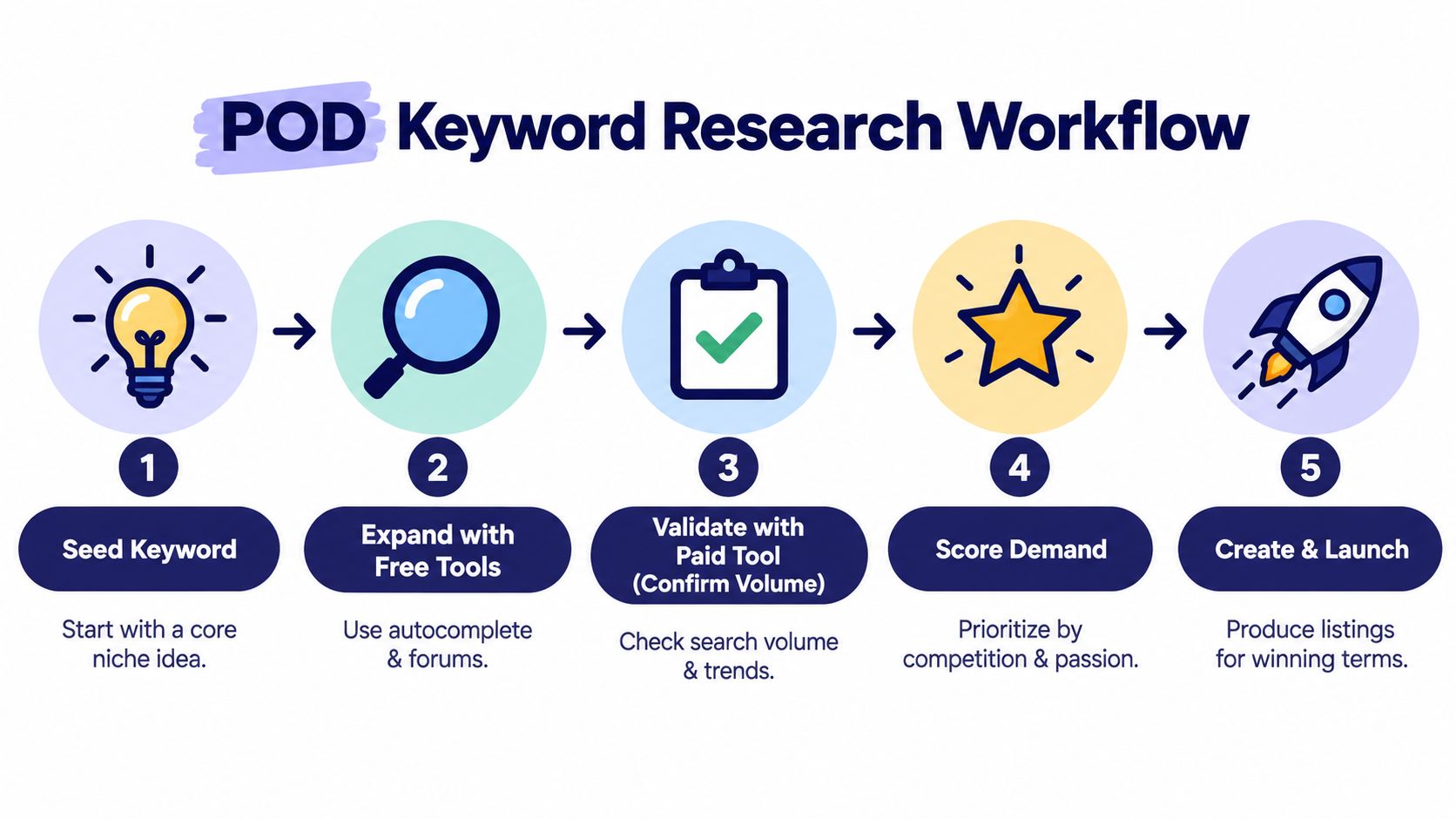
A repeatable process prevents the most expensive mistake in POD keyword research, designing first and validating later. Use this order:
- Choose one seed. Start with a niche, audience, occupation, pet, hobby, or occasion you can express visually.
- Expand for free. Search autocomplete on TeePublic, Amazon Merch, Redbubble, Etsy, and Google. Add People Also Ask, Search Console queries, forums, and competitor listing language.
- Cluster the candidates. Remove spelling and punctuation duplicates. Group terms by dominant intent, and assign one primary phrase to each potential listing.
- Confirm demand. Use Google Keyword Planner or a paid platform to compare volume, CPC, competition, and trend direction. Don't mistake a precise-looking estimate for proof of marketplace sales.
- Score the opportunity. Compare demand with listing depth, seller strength, and product fit.
- Validate the stores. Search the final candidates directly on TeePublic, Amazon Merch, Redbubble, and Etsy. Check whether successful designs exist and whether the results leave room for a distinct angle.
- Check trademarks. Search the exact phrase in the USPTO database, then expand to similar wording and relevant design-code searches. The USPTO recommends focusing mainly on live applications and registrations because live marks can block registration, as explained on its federal trademark search page.
- Design and list. Use the strongest phrase naturally in the title, tags, and description. Don't stuff every related term into one listing.
The trademark step deserves its own place in the sequence. The USPTO search system supports structured fields and status filters, and its help page describes live or pending applications and maintained live registrations. It even provides a query pattern for finding live marks containing a word, such as CM:word AND LD:true AND CC:000, which you can adapt inside the database interface at the USPTO search help page.
AI can help organize clusters or turn raw suggestions into research prompts, but it shouldn't replace marketplace checks or legal screening. For a practical perspective on using structured prompts in search work, see Prompt Builder's approach to AI SEO.
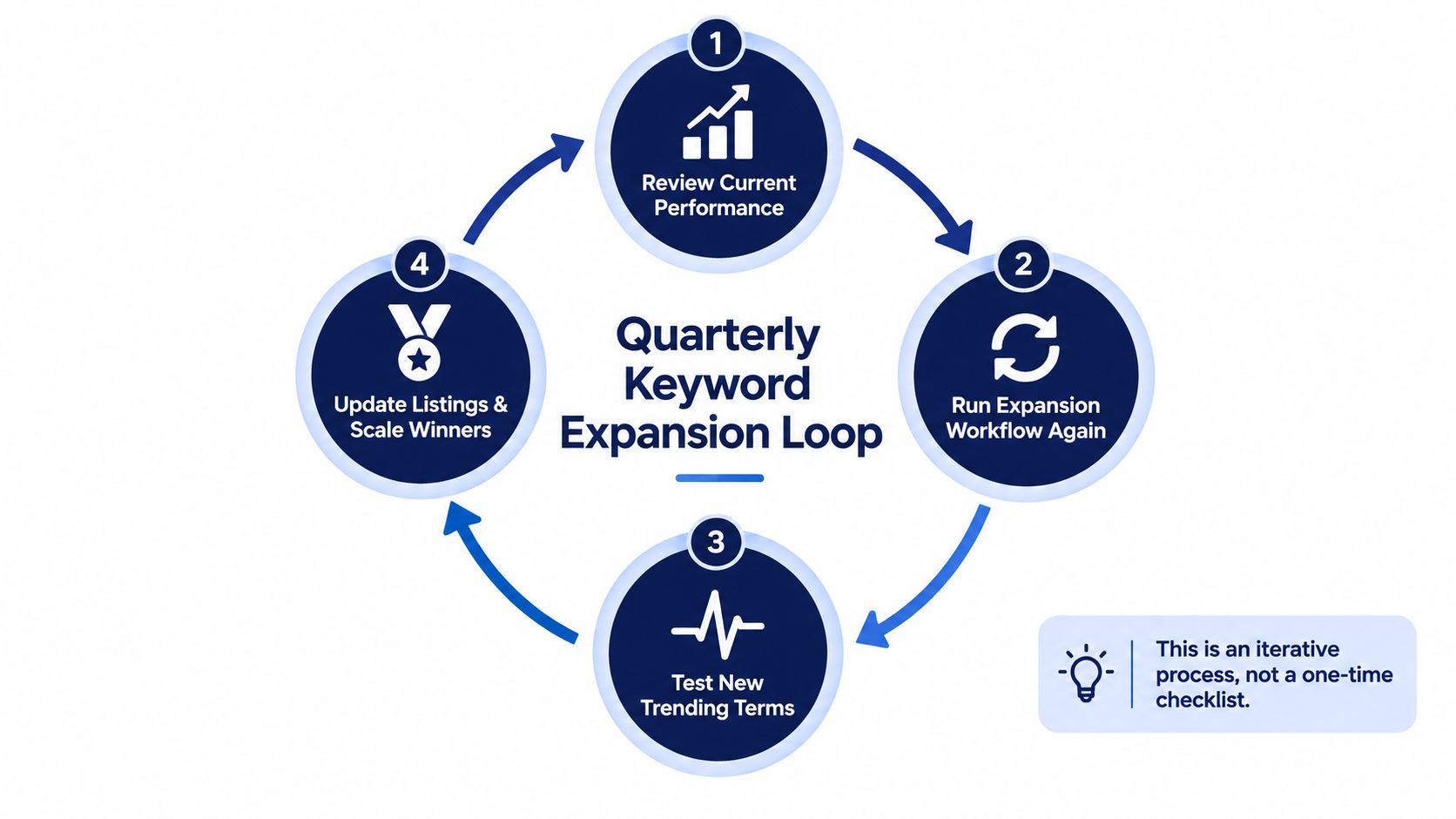
A poor score isn't wasted effort. It becomes a better seed for another expansion round. The workflow loops because buyer language, seasonal interest, and marketplace competition change.
Expanding One Niche Into Related Keywords
Use “corgi mom gifts” as the seed. Etsy autocomplete might surface “corgi mom mug,” “corgi mama shirt,” and “corgi mom necklace.” Google questions and Etsy related searches may add recipient angles such as “corgi grandma,” which changes the design brief rather than merely changing a tag.
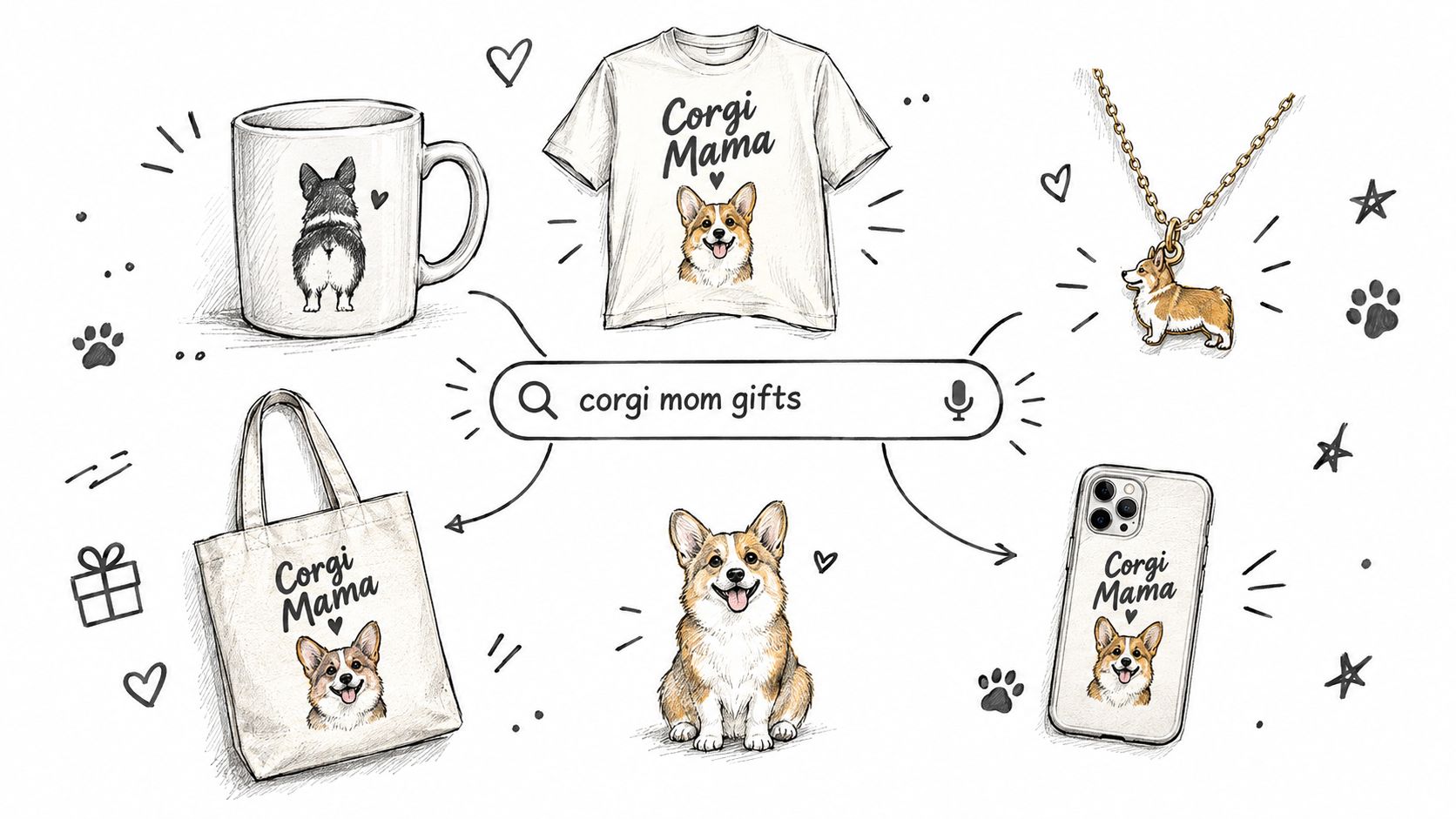
I'd place the candidates into separate intent groups:
- Corgi mom mug: a gift or drinkware product with room for personalized text.
- Corgi mama shirt: apparel for the wearer, with a family-identity angle.
- Corgi mom necklace: jewelry intent, which requires different product expectations and imagery.
- Corgi grandma: a recipient variation that may work across several product formats.
Then compare them using the same rubric. Check search demand, trend behavior, marketplace depth, review strength, and whether the product format fits your production setup. Don't select the phrase with the largest estimate automatically. A narrower phrase with obvious gift intent and weaker competition may be a cleaner first test.
For related keyword organization, a long-tail keyword research workflow is useful because it keeps specific phrases connected to the broader niche without treating every variation as a separate opportunity.
Before drawing the design, search “Corgi Mom” in the USPTO system. Start with the exact wording, then inspect similar wording and the goods and services categories relevant to apparel or gifts. The USPTO Trademark ID Manual provides searchable descriptions for acceptable goods and services, and its TM5 search option identifies entries accepted by multiple participating trademark offices. A search isn't a legal opinion, so an unclear result deserves professional advice rather than a guess.
After the checks, test distinct angles rather than four copies of one design. A title might focus on “Corgi Mom Mug” for the drinkware listing, “Corgi Mama Shirt” for apparel, and “Corgi Grandma Gift” for the recipient variation. Keep each title readable and let the product, audience, and design communicate the intent.
Here's the marketplace validation sequence in practice. Search each phrase on the four stores, note the strongest competing designs, and record which visual themes repeat. Then create only the concepts that offer a clear difference in wording, illustration, personalization, or audience.
Closing Thoughts and What to Do Next
Keyword research for POD isn't a checklist you complete once. It works as an iterative loop. Revisit autocomplete, refresh Search Console queries, inspect marketplace best sellers, and feed new language into your next research pass.
The two checks that protect the most time are straightforward. Validate demand on TeePublic, Amazon Merch, Redbubble, or Etsy before designing, then run a USPTO trademark search before publishing. A promising phrase that fails either check shouldn't move directly into production.
Pick one seed from your store this week. Expand it through free sources, score five candidates, validate the strongest phrases across the marketplaces, and design only the ideas that clear both the demand and trademark checks.
Trendlytic brings related-keyword research together with live bestseller data from TeePublic, Amazon Merch, Redbubble, and Etsy, plus a built-in USPTO trademark check. Visit Trendlytic to compare niche demand, competition, and validated design ideas before your next upload.