Keyword Research API: A Practical Guide for POD Sellers

A keyword research API delivers keyword data on demand, letting sellers evaluate far more ideas than hands-on research ever could. For print-on-demand specifically, that means uncovering related phrases, demand signals, competition levels, and trend direction before committing to a design.
Table of Contents
- Why Manual Keyword Research Stops Working
- What a Keyword Research API Actually Does
- Three Common Keyword Research API Shapes
- Where the API Fits in Your Process
- Build the First Shortlist
- Filter and Validate Candidates
- Compare the Practical Tradeoffs
- Match the Provider to the Workflow
- Score Ideas by Direction
- Test Before Expanding
- Automate Collection, Not Taste
- Is a Keyword Research API Worth the Cost?
- Do I Need Technical Skills?
- How Accurate Is Low-Competition Search Volume?
- Can I Use Scraped Suggestions Legally?
- What Should My First Month Look Like?
Why Manual Keyword Research Stops Working
Manual research worked fine when marketplaces held fewer listings and a seller could scan a category in an afternoon. Today, TeePublic, Amazon Merch, Redbubble, and Etsy host millions of designs across hundreds of sub-niches. The long tail has fractured into more fragments than one person can reliably follow.
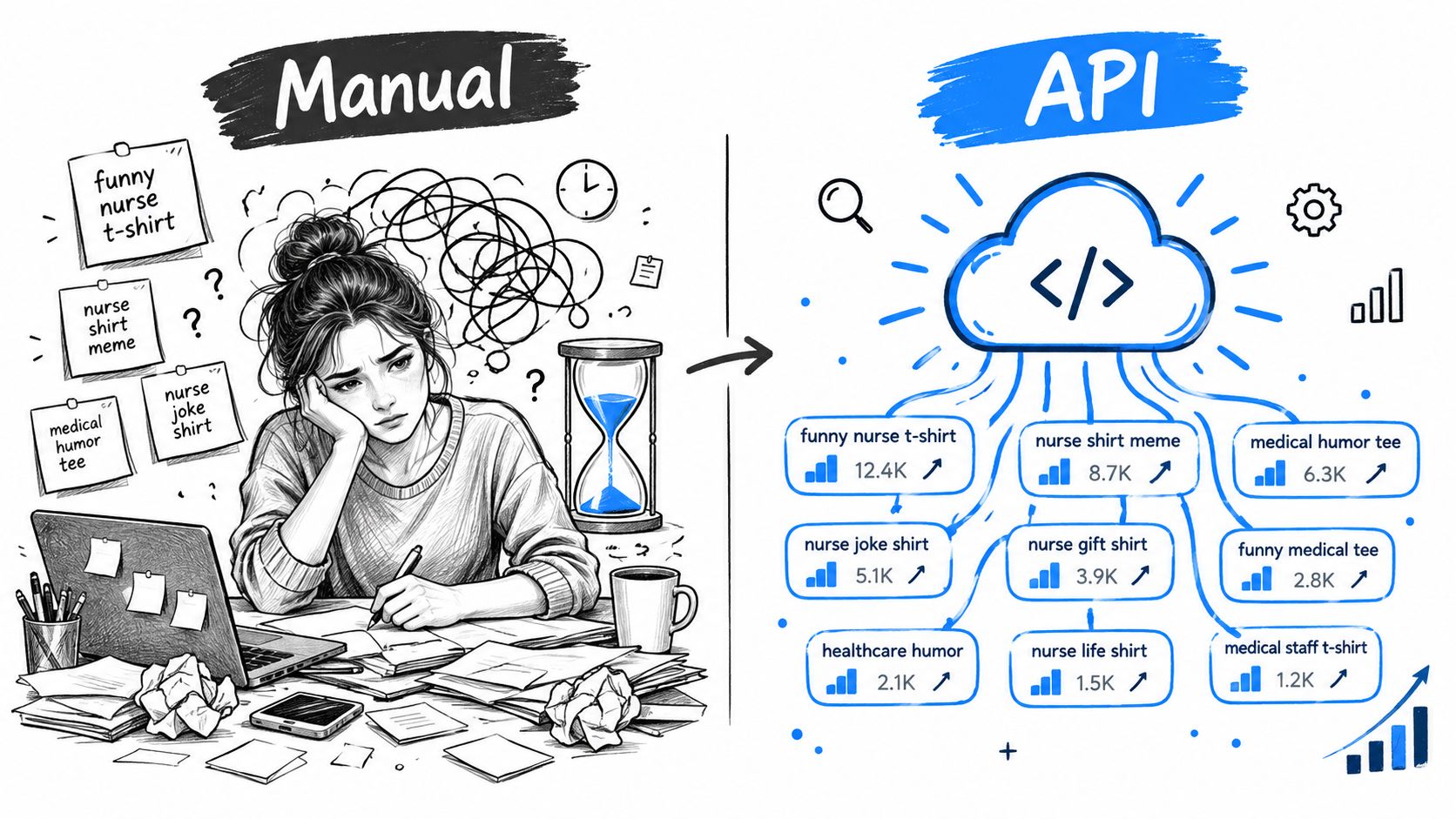
The bottleneck appears quickly. Even a focused researcher can realistically assess about 20–50 keywords per hour when factoring in search results, listing quality, and basic competition checks. Competition data can also shift week to week, so notes from last Tuesday might already describe a different market.
Manual research brings judgment to the table, but it is slow for discovery.
Browser scraping and tools like Merch Informer can speed up parts of the process. Neither eliminates every bottleneck, though. Once you are dealing with large batches, cleaning, comparing, refreshing, and storing the data becomes unwieldy. Sellers can end up reacting to visible trends instead of spotting early signals.
Take “funny nurse t-shirt” as an example. A manual search surfaces the obvious head term and perhaps a handful of familiar variations. A keyword research API might return 200 related long-tail phrases with estimated search volume, competition density, and trend direction. From that list, you could spot narrower angles such as shift-specific humor, specialty nursing roles, or gift-buying intent.
Not every API result deserves a product page. The practical advantage is starting with a broader shortlist and reserving human judgment for validating the strongest leads.
- Manual research excels at evaluating tone, design quality, and cultural fit.
- API research excels at collecting, refreshing, and sorting large keyword sets.
- A sensible workflow blends both rather than treating automation as a replacement for experience.
Human validation still matters, especially right before publishing. It simply cannot handle the entire discovery phase efficiently on its own.
Platforms like Trendlytic take a similar approach for POD research, pairing marketplace data with trademark screening across 850K+ active USPTO trademarks so sellers can explore opportunities without repeating the same manual searches.
What a Keyword Research API Actually Does
A keyword research API lets you pull keyword data directly into your own tools through a predictable request-response setup. Think of it as a research assistant: you provide a seed phrase like “retro cat mom gift,” optionally set a marketplace or location, and receive organized data instead of working only inside a dashboard.
Here is what that cycle looks like in practice:
- Send a phrase, such as “retro cat mom gift.”
- Specify the market, location, or platform, if the provider supports it.
- Receive structured data, usually as JSON.
- Filter and rank the results using your own rules.
Depending on the endpoint, you might see estimated volume, difficulty, competition level, trend direction, and 40 related phrase variants grouped by intent. Some providers also return CPC estimates or marketplace listing counts—numbers that can save you from stitching together several tools.
An API collects evidence quickly. It does not decide whether an idea deserves a design.
Three Common Keyword Research API Shapes
Not every keyword research API works the same way. I find it useful to group the options into three practical categories:
| API Type | Data Returned | Best Use |
|---|---|---|
| Search-volume endpoint | Volume, difficulty, CPC, and trends | Comparing demand across a seed list |
| Autocomplete API | Suggested phrases from search predictions | Finding language buyers actually type |
| Competitor-analysis API | Listing counts, rankings, and competitor details | Checking marketplace saturation |
A search-volume endpoint is useful for broad SEO work, but print-on-demand research usually needs marketplace context. Google demand and Etsy, Amazon Merch, Redbubble, or TeePublic demand do not always line up. Treating them as interchangeable can lead to poor decisions.
Before committing to a workflow, review the operational details. Nearly every provider requires API-key authentication, applies rate limits, and charges based on request volume. Entry-level plans often cover testing or small batches, while higher tiers are where scheduled refreshes and larger datasets become practical.
For POD sellers, Trendlytic takes a narrower approach by analyzing live bestseller data across TeePublic, Amazon Merch, Redbubble, and Etsy. Its built-in USPTO check can also flag potential trademark issues using a database of 850K+ active trademarks. That is a useful early check, but it is not legal advice.
Where the API Fits in Your Process
An API does not replace your judgment. It removes much of the data-collection work, so you can spend more time evaluating design fit, understanding audience intent, and deciding whether a candidate niche is worth testing.
A weekend setup can turn scattered ideas into a repeatable research process. I start with customer questions, relevant Reddit threads, and existing bestseller pages, then collect useful phrases in one raw list.
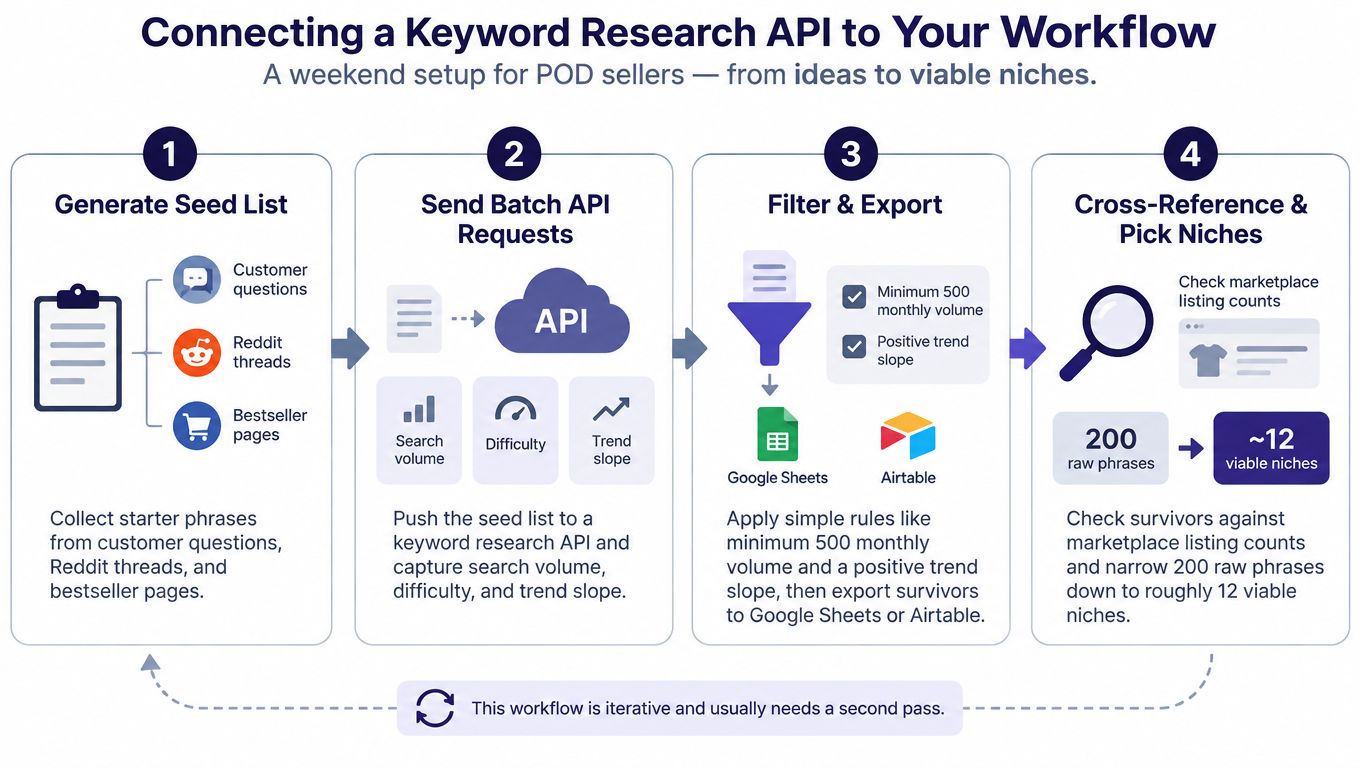
This infographic shows the four-stage path from seed collection to marketplace checks, including the drop from 200 raw phrases to roughly 12 viable niches. The important point is that this is an iterative process, not a one-click solution.
Build the First Shortlist
I typically start with about 200 raw phrases. They might include “funny nurse shift gift,” “retro cat mom,” or “camping dad birthday.” At this stage, I do not worry about duplicates or weak ideas. Quantity matters more than polish.
From there, I send the phrases as batch requests to a keyword research API. The response should capture at least:
- Monthly search volume
- Keyword difficulty or competition level
- Trend direction, such as rising, flat, or declining
- Related phrase variants worth exploring
On the technical side, a simple Python script using the requests library is enough to send authenticated calls and save the JSON response. For a no-code route, Zapier handles integrations, while Notion works well when API results need to become records in a product pipeline.
Filter and Validate Candidates
Next, I apply basic filters—minimum monthly volume of 500 and a trend slope above zero. What survives goes into Google Sheets or Airtable, where sorting and manual review are easier.
| Stage | Example Result |
|---|---|
| Raw phrases | 200 |
| Positive trend and 500-plus volume | 38 |
| Marketplace spot checks | 18 |
| Viable niche candidates | 12 |
Those 12 ideas still need a second pass. I cross-reference them with marketplace listing counts through another API call when available, or manually search platforms such as TeePublic, Amazon Merch, Redbubble, and Etsy.
The API handles data collection. I still decide whether a phrase translates into a product worth designing.
For POD work, trademark risk needs checking before any design work starts. Trendlytic offers a useful starting point here: it reviews live bestseller data across those marketplaces and runs a built-in USPTO trademark check. I treat any result as a prompt for careful review, not as a legal conclusion.
You might also find it useful to read how to build a reliable keyword research process.
Early results rarely survive untouched. Duplicate phrases, seasonal terms, and misleading volume estimates tend to surface, so I run a second pass, tighten the filters, and keep only ideas that fit the audience and the design style I can produce.
Choosing a keyword research API comes down to the specific job. I tend to sort the options into three buckets: autocomplete services that pull search suggestions, SERP APIs that return live search results, and POD-focused tools that structure marketplace data for you.
Most general-purpose providers were built with Google in mind, not product discovery. That distinction matters when a phrase shows search interest but has little buyer demand on Etsy, Redbubble, TeePublic, or Amazon Merch.
Compare the Practical Tradeoffs
| API Type | Monthly Free Requests | Marketplace-Specific Data | Historical Trend Data | Typical POD Fit |
|---|---|---|---|---|
| Autocomplete API | Often free or limited | Usually no | Limited | Good for phrase discovery |
| SERP analytics API | Varies by provider | Usually no | Often available | Good for Google competition |
| POD data API | Provider-specific | Yes | Often included | Best for marketplace research |
Autocomplete providers are inexpensive for generating variations, but their suggestions are not proof that anyone is buying. SERP services provide deeper competitor and ranking data, though they can become expensive when every query uses credits. Some, such as DataForSEO, use pay-as-you-go pricing, while platforms like Moz and Zenserp offer lower-volume entry points based on their published plans.
Latency is worth considering too. A solo seller may be fine waiting a few seconds for a small batch, but an agency refreshing thousands of terms needs queuing, caching, and predictable rate limits. Look beyond whether a free tier exists and check how many monthly requests it actually includes.
A low price does not help much if the API lacks marketplace context or makes routine refreshes difficult.
Historical data is another dividing line. A current trend score tells you what is moving now, but a 12-month lookback helps distinguish a durable niche from a seasonal spike. For a broader framework on comparing data sources and competitors, this guide to winning SERPs with intel offers useful questions to adapt.
Match the Provider to the Workflow
For POD-specific work, I like starting with marketplace evidence and then using general SEO data as a second check. Trendlytic follows that approach across TeePublic, Amazon Merch, Redbubble, and Etsy, and its trademark check searches 850K+ active USPTO trademarks.
If your priority is finding related wording, an autocomplete API might be enough. If you need live Google results, use a SERP provider. If you want product ideas grounded in what is selling on marketplaces, a POD research platform is usually the more direct option.
Read also: how a POD niche research tool supports marketplace research.
Before committing to a subscription, test a small batch, compare the returned data against real marketplace searches, and measure response time under your normal workload. That check often tells you more about fit than a feature list.
I approach automated niche discovery as a funnel rather than a vending machine. A keyword research API delivers suggestions and metrics, but I weigh whether an idea matches the audience, marketplace rules, and designs I can actually produce.
I start with a seed phrase like “cat dad gift” and run it through a small script or no-code automation. The workflow pulls in related phrases, removes duplicates, and flags basic compliance concerns, including obvious trademark terms, restricted wording, and phrases that do not fit the target marketplace.
Automated keyword research can support modern niche discovery for POD marketplaces. The MakeAutomation keyword research guide covers the basics if you are building repeatable research workflows from scratch.
Score Ideas by Direction
I typically score each candidate across three dimensions:
- Search volume, to gauge existing demand.
- Competition, to see how saturated the results look.
- Trend direction, measured over a 12-month window rather than a single week.
A phrase with strong volume but a downward slope can be less appealing than a quieter phrase that has climbed steadily for months. I also watch for seasonality, because a holiday spike can look promising while leaving little demand behind.
Suppose a cat-themed search produces 20 candidate phrases. After reviewing volume, competition indicators, and 12-month trend curves, I might narrow the list to five phrases with rising momentum.
I use the score to sort the queue, not to make the final call.
Test Before Expanding
From those five, I pick one phrase with clear buyer intent and create 10 designs for a controlled test on two marketplaces, usually Etsy and Redbubble. If the concept performs reasonably, I might adapt it for Amazon Merch, but I check each listing against that marketplace’s current guidelines first.
I keep the test deliberately small because early data is noisy. Ten related designs can teach more than fifty random uploads.
For broadening my phrase lists, I also lean on Trendlytic, which scans live bestseller data across TeePublic, Amazon Merch, Redbubble, and Etsy. Its built-in USPTO check helps surface potential conflicts, though I treat that as an early screening step, not legal advice.
You can read how to find related keywords for another practical way to expand a seed list.
Once the test wraps, I refresh the API data, compare the trend direction against actual marketplace results, and run a second pass. That follow-up can eliminate phrases that looked strong on paper but do not translate into sellable products. My goal is not to automate taste or judgment; it is to reserve those decisions for a shorter, better-informed list.
A keyword research API can speed up discovery, but speed does not make every decision better. Small research errors can accumulate quietly, leaving a catalog full of designs aimed at yesterday’s demand.
The first mistake is chasing high search volume without checking trend direction. A phrase peaking this week may already be late. I compare current volume with a longer trend curve, then ask whether the interest is steady, seasonal, or fading.
High volume shows attention. It does not prove that the timing is right.
I also avoid treating API numbers as marketplace truth. Google volume and buyer activity on Etsy or Amazon Merch can differ sharply, so I sample promising phrases through real searches. I check listing quality, recent uploads, pricing, and whether the results reflect genuine purchase intent.
Another quiet error is over-filtering by competition. A crowded result can still convert when leading listings are stale, poorly designed, or poorly tagged. Competition metrics should narrow a review queue, not automatically eliminate every candidate.
Automate Collection, Not Taste
Automation works best for repetitive tasks. I use it to gather suggestions, refresh metrics, remove duplicates, and flag obvious trademark concerns, while keeping the final niche decision manual.
That human review matters because numbers cannot judge whether a joke feels natural, whether a phrase fits a specific audience, or whether a design idea works on TeePublic, Redbubble, Etsy, or Amazon Merch. Trendlytic can help with live bestseller data and its built-in USPTO trademark check, but I still treat flags as prompts for further review, not legal conclusions.
Finally, I refresh old queries. POD demand can change quickly, and a spreadsheet that looked useful weeks ago can become misleading. I schedule recurring checks and record the date beside every result.
- Recheck trend direction before designing.
- Validate demand on the target marketplace.
- Review stale top listings manually.
- Refresh saved queries regularly.
The practical lesson is simple: a keyword research API is leverage, not a replacement for audience knowledge. I use it to create a better shortlist, then rely on judgment before publishing.
Is a Keyword Research API Worth the Cost?
The honest answer comes down to catalog size. When I am working with ten products and enjoy doing the research myself, a paid API can feel unnecessary. Once I am publishing regularly, the hours add up—gathering suggestions, checking listings, refreshing trends, and recording everything. That is where an API can become a practical investment.
I compare the subscription price with the time I actually spend on repetitive tasks. If data collection keeps pulling me away from design work, the cost may be easier to justify.
| Situation | Practical Choice |
|---|---|
| Small catalog | Manual checks may be enough |
| Growing catalog | Batch research can save time |
| Agency or team | Automation is easier to justify |
Trendlytic is built for POD sellers and covers TeePublic, Amazon Merch, Redbubble, and Etsy. It also includes a USPTO trademark check, which works as an early screening step—not legal advice, but a useful prompt before I invest time in a design.
Do I Need Technical Skills?
Not necessarily. I can set up a no-code connection through Zapier, send results into Google Sheets, Airtable, or Notion, and review everything there. That is enough for many small workflows.
A custom API integration is a different story. I would need to understand API keys, request limits, JSON responses, error handling, and secure data storage. That requires basic programming knowledge.
My advice is to start with one small batch rather than building something elaborate. A simple workflow is easier to troubleshoot when the data does not line up with what I am seeing on a marketplace.
I automate collection first, then keep the final niche decision human.
How Accurate Is Low-Competition Search Volume?
I always treat search volume as an estimate, especially for narrow POD phrases. Low-volume keywords can be useful, but small datasets can look more precise than they really are.
Google volume does not equal demand on Etsy, Redbubble, TeePublic, or Amazon Merch. I use API metrics to prioritize candidates, then search the target marketplace and review the actual listings.
Here is a concrete example: if “cat dad camping shirt” shows modest volume but rising interest, I would check whether buyers are searching similar phrases and whether the existing designs look dated or weak. The API gets me to the starting line; the marketplace helps me judge whether the idea is worth pursuing.
Can I Use Scraped Suggestions Legally?
This is where I tread carefully. A search suggestion is not automatically protected, but collecting data may still be restricted by a platform’s terms, usage limits, copyright rules, or privacy requirements.
I avoid copying designs, seller descriptions, images, or proprietary datasets. I also respect API documentation, rate limits, and marketplace rules. For trademark concerns, Trendlytic’s check against 850K+ active USPTO trademarks can flag terms for further review. It is a screening tool, not a replacement for legal advice.
What Should My First Month Look Like?
I would spend the first week testing a small seed list and comparing API results against real marketplace searches. In weeks two and three, I would select a few candidates, run trademark checks, and create a controlled set of designs.
By week four, I would review impressions, clicks, favorites, sales, and differences across marketplaces. I would not expect a reliable verdict from one month or a handful of uploads; that is rarely enough data to draw firm conclusions.
For a small catalog, manual research may remain simpler. For a scaling catalog, a keyword research API can provide a repeatable starting point without telling me what to create.
Trendlytic can help you check POD niches across four marketplaces and screen keywords before designing. Explore Trendlytic if you want to compare it with your current process.