Print on Demand Apps for Shopify: Honest Setup Guide
There are more than 200 print-on-demand apps in the Shopify App Store, but most sellers should narrow their choice by fulfillment speed, refund impact, and niche safety rather than features alone. The right app is the one that protects your margin and customer experience after the order is placed, not the one with the longest product catalog.
Why does a store owner compare mockup generators first, then discover too late that slow delivery, failed tracking, or a trademark complaint has erased the profit from a sale?
I've found that the practical question isn't “Which Shopify POD app has the most products?” It's “Which workflow fits my customers, pricing, geography, and risk tolerance?” That shift makes the crowded app marketplace much easier to work with.
Table of Contents
- Why Print on Demand Apps Feel Overwhelming on Shopify
- What Shopify Print on Demand Apps Actually Do
- How to Compare the Main Print on Demand Apps for Shopify
- Step by Step Setup Workflow for New Shopify Stores
- How Niche Research Tools Fit Into a POD App Workflow
- The Real Cost Math Behind POD Margins on Shopify
- Common Misconceptions About Passive Print on Demand Income
- Practical Next Steps for Scaling a Shopify POD Store
Why Print on Demand Apps Feel Overwhelming on Shopify
A new Shopify seller can spend an afternoon opening app pages, comparing product counts, reading promises about automation, and still not know which option fits the store. One provider appears attractive because it offers a broad apparel catalog. Another emphasizes local production. A third focuses on branding or fast setup.
The problem is that these features sit before the sale. They don't tell you what happens when a customer in another region waits longer than expected, a garment variant maps incorrectly, or a refund leaves you paying a processing fee.

Shopify's print-on-demand app collection says merchants can choose from more than 200 POD apps. The same collection highlights over 200 integrations and a catalog of more than 1,000 products from one major provider. It also shows Printful with 3,909 reviews and Gelato with 1,012 reviews, practical signs of sustained marketplace adoption rather than a tiny experimental category.
That maturity is useful, but it creates a new problem. You aren't choosing between POD and no POD. You're choosing between many operational systems that can all connect to Shopify.
Start with the failure you most want to avoid
If your buyers care about delivery dates, fulfillment routing deserves more attention than design tools. If you sell in a trademark-sensitive niche, compliance screening matters before product selection. If your prices are low, payment fees and refunds may matter more than a slightly wider catalog.
Write down three priorities before installing anything:
- Customer promise: Decide how much delivery uncertainty your audience will tolerate.
- Margin protection: Include production, shipping, app charges, payment processing, refunds, and marketing.
- Niche safety: Remove designs that depend on protected names, logos, lyrics, characters, or likenesses.
That list will usually eliminate more apps than a feature comparison page ever could.
What Shopify Print on Demand Apps Actually Do
A POD app is the operating connection between your Shopify storefront and a production partner. It doesn't just place a product image on a product page. It carries product data into the store, sends paid order information back to the provider, and often returns shipment information to Shopify.
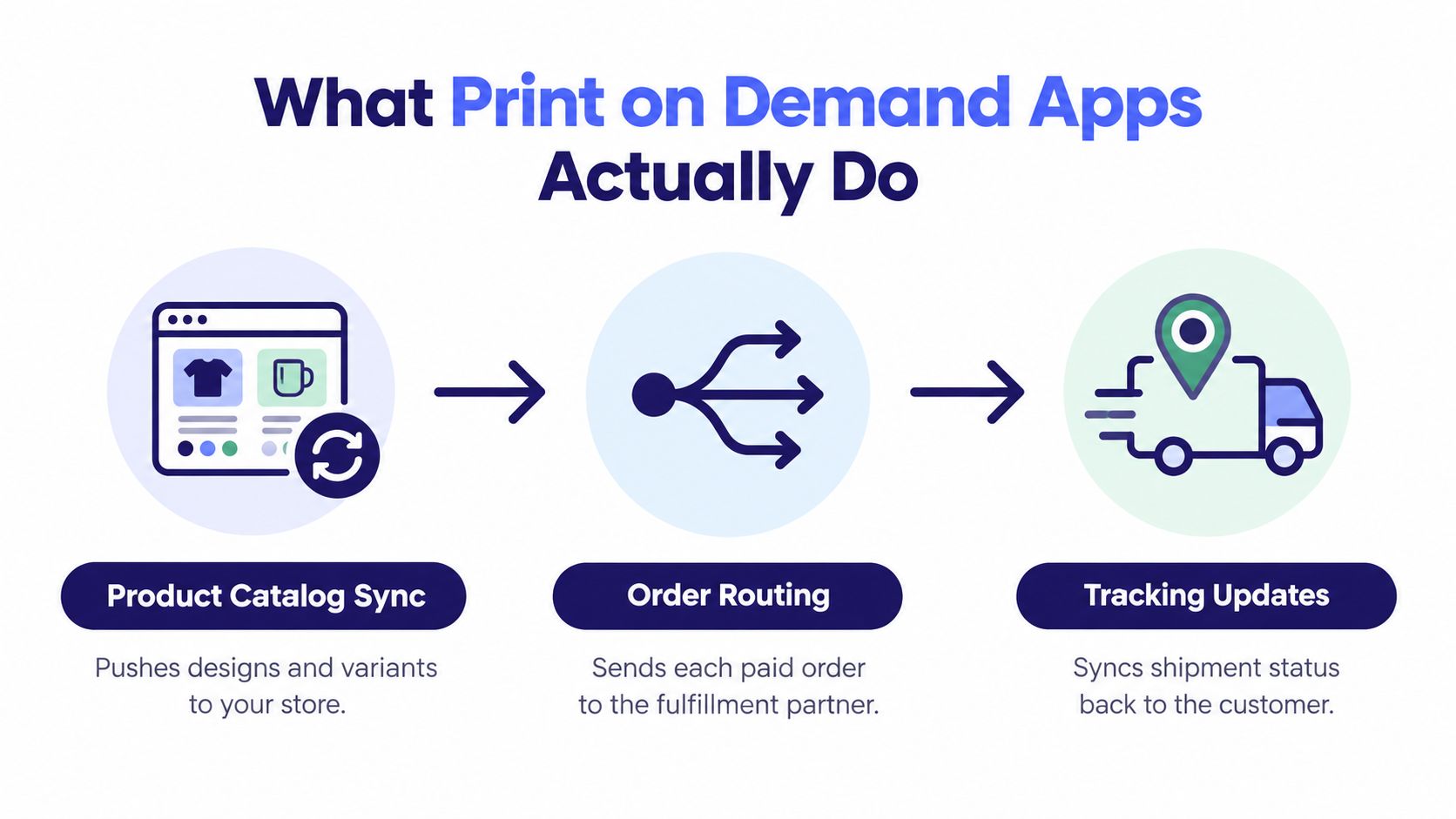
Shopify POD documentation, summarized in this operational overview of print on demand for Shopify, describes a marketplace with 200+ apps. Once connected, products can be added to the store automatically and orders can be routed directly to a POD provider.
That sounds simple from the storefront side. Behind the scenes, the app has to preserve the relationship between your Shopify product, its variants, the design file, the production option, and the provider's SKU. A black T-shirt in one size isn't interchangeable with a different garment that happens to have the same title.
The three handoffs that matter
Catalog synchronization pushes product names, descriptions, mockups, sizes, colors, and other variant data into Shopify. A sync error can publish an incomplete product or leave a customer choosing a variant that the provider can't produce.
Order handoff begins when the customer pays. The app sends the order details, shipping address, selected variant, and artwork to the fulfillment partner. If an order is routed to the wrong product or remains stuck in an approval state, automation has only moved the manual problem somewhere less visible.
Tracking updates return production and shipment status to Shopify. Customers don't experience your app dashboard. They experience the email that says an order has shipped, or the absence of one.
Practical rule: Treat the app as a fulfillment control point, not a storefront decoration. Test SKU mapping, order status changes, and tracking before you send traffic.
The same principle applies when you sell across several channels. A useful reference on print on demand for marketplaces can help clarify how marketplace workflows differ from a Shopify-owned storefront, especially when order data and customer communication are split between platforms.
The following video is useful for seeing the basic connection in context:
How to Compare the Main Print on Demand Apps for Shopify
Popularity isn't a sufficient selection method. An app can have a polished interface and still be a poor fit if its production network doesn't serve your main customers well or if its base costs leave no room for refunds.
I compare providers by the job they need to perform in my store. The best choice for a regional apparel brand may be a poor choice for a global poster business, and a low-cost marketplace provider may create more quality-control work than a premium provider.
POD App Trade-offs by Operational Priority
| App Type | Best For | Key Trade-off |
|---|---|---|
| Marketplace-based provider | Sellers who want to compare suppliers and control product costs | Supplier quality and delivery consistency can vary, so samples and provider selection matter |
| Vertically managed provider | Brands that value consistent production and more controlled presentation | Higher base costs can reduce room for discounts, refunds, and paid acquisition |
| Regional fulfillment network | Stores serving customers across several countries or shipping zones | Local routing may improve delivery in one market while product availability differs in another |
| Speed-focused provider | Products where a clear delivery promise influences conversion | A narrower catalog or fewer branding options may limit the rest of the store |
| Specialty catalog provider | Niche products that standard apparel-focused apps don't cover | A less familiar workflow can mean fewer resources when an unusual order problem appears |
| Multi-app setup | Stores assigning different collections to different operational strengths | More apps create more SKU, shipping-profile, and support complexity |
The table is a decision map, not a ranking. Start with the customer location and the product category, then check the provider's production route for that combination.
What to check on every app page
Look beyond the product count. Review the actual base cost of your likely bestsellers, the shipping charge to your main markets, and whether the provider can produce the exact garment or accessory your design requires.
Then investigate the less visible questions:
- Routing: Can you control or understand where an order is produced?
- Quality: Can you order a sample before publishing the item?
- Returns: Does the provider distinguish between a production defect, buyer error, and a change of mind?
- Tracking: Does the status reliably return to Shopify?
- Support: Can you get a clear answer when an order is delayed?
A broad catalog is valuable only when the products arrive in acceptable condition, at a cost your pricing can support, within a delivery window your product page can clearly state.
Step by Step Setup Workflow for New Shopify Stores
A clean setup is slower than clicking through the default settings, but it prevents expensive corrections after launch. I prefer to treat the first product as a controlled test rather than assuming that a successful app installation means the store is ready.
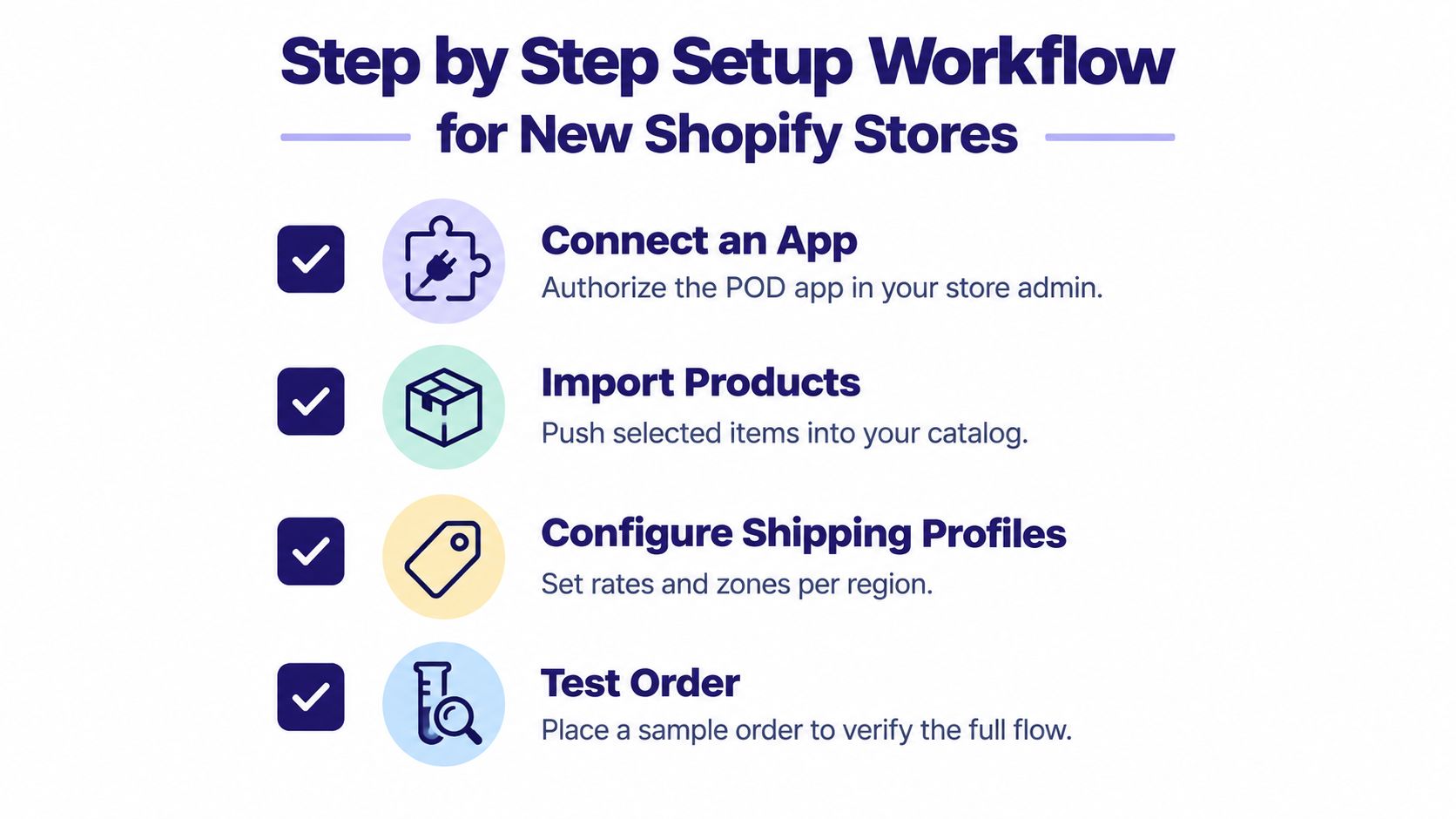
Connect the app and review permissions
Install the provider from Shopify, authorize the connection, and read what the app can access. Confirm that it can create products, receive orders, and return fulfillment updates. Don't publish anything yet.
Check whether the app creates draft products or publishes them immediately. Draft-first workflows give you time to inspect titles, variants, pricing, images, and shipping settings before customers see them.
Import one product carefully
Choose one product that represents the store. Import it, then compare the Shopify listing with the provider's source page. Check every size, color, print area, mockup, and SKU.
A common mistake is assuming that a product title describes all of its variants equally. If one color uses a different garment or production method, your cost and customer expectations may change.
For a beginner-friendly explanation of the wider model, use this guide to print on demand for beginners, then return to the technical checks inside your Shopify admin.
Configure shipping profiles by destination
Shipping settings should match the provider's actual route, not a generic promise such as “fast worldwide delivery.” Separate zones where costs or delivery expectations differ, and make sure the rate shown at checkout doesn't create a surprise loss on a low-priced item.
Independent coverage of POD shipping reports typical production-plus-shipping windows of 6–14 days in the US and 10–21 days internationally, while local fulfillment networks may bring delivery to roughly 6–12 days. Peak-season production can add 3–5 days, according to this POD shipping time guide.
Place a test order
Use a sample order to verify the full chain. Confirm that the correct design and variant reach the provider, that the order leaves the appropriate status, and that tracking returns to Shopify when available.
Don't launch paid traffic until you know what the customer receives in the order confirmation, shipping email, and tracking page. Those messages shape trust more than the app dashboard does.
How Niche Research Tools Fit Into a POD App Workflow
A POD app can fulfill a product nobody wants, or turn a protected phrase into an orderable listing. Both problems begin before production. Research first, then assess whether the product's quality, shipping route, and compliance risk leave enough room after the sale.
Start with demand signals from relevant marketplaces. Review recurring themes, product formats, and design angles across TeePublic, Amazon Merch, Redbubble, and Etsy. The goal is to identify categories that attract buyers and see where competition is concentrated, not to copy an existing listing.
Research before production
Trendlytic is one example of a POD niche research tool covering TeePublic, Amazon Merch, Redbubble, and Etsy. It combines marketplace research with demand and competition signals, surfaces seller designs, and includes a built-in USPTO trademark check. For a fuller look at the research-before-production process, use a niche research guide for POD sellers.
Run that review before creating a large catalog or polishing mockups. A trademark screen can flag words, phrases, and symbols before artwork reaches a POD app, when changing the concept is cheaper than removing a live product or handling a takedown.
Amazon Merch on Demand is invitation-only, so compliance matters in that channel. A 2026 trademark safety guide for POD sellers recommends searching the USPTO database for marks covering words, phrases, or symbols in a design. It also warns against using pop culture references, mascots, university logos, song lyrics, or celebrity likenesses without written licensing.
Build a safer publishing loop
Use this sequence for each new collection:
- Find a demand pattern: Compare marketplace results and identify a clear audience or use case.
- Separate inspiration from copying: Develop original wording, composition, concept, and visual treatment.
- Run a trademark check: Search important terms, alternate spellings, and related phrases.
- Choose the product: Match the design to a product whose quality and shipping economics fit the audience.
- Publish selectively: Begin with a small set of validated products and inspect the customer-facing pages.
A trademark search does not grant permission to use an idea, and a marketplace result does not prove that a design is safe. It gives you a documented review point before production, listing exposure, and post-sale problems can consume margin.
The Real Cost Math Behind POD Margins on Shopify
A Shopify POD sale isn't the same as profit. The retail price has to absorb the provider's production charge, shipping, Shopify plan costs, app subscriptions, payment processing, marketing, customer service, and the cost of orders that become refunds or replacements.
Shopify's print-on-demand business guidance identifies production costs, subscription fees, and marketing expenses as part of the model. An independent Shopify-cost analysis also notes that refunding a customer doesn't recover the original payment processing fee, so a sale can still reduce your margin after the money is returned.
Build the calculation before setting the price
For each product, record:
- Selling price: The amount the customer pays for the item.
- Production cost: The provider's charge for the selected product and print method.
- Shipping cost: The amount you pay, and the amount you collect at checkout.
- Platform and app costs: Recurring charges allocated across the orders they support.
- Payment cost: The processing amount that may remain partly unrecovered after a refund.
- Acquisition cost: Advertising or other marketing spend connected to the order.
- Post-sale allowance: A realistic reserve for replacements, refunds, and support time.
A spreadsheet is enough. The important point is to calculate by market and product, because a price that works for domestic delivery may fail internationally.
For comparison, Etsy charges a $0.20 listing fee and a 6.5% transaction fee on the total sale price including shipping. Payment processing varies by country. One US example for a $30 product with $5 shipping estimates total platform fees of about $3.78 before production and advertising, as outlined in this POD marketplace cost report.
Refunds expose weak pricing
A refund is not just a reversal of revenue. You may already have paid the provider, shipping, processing, and advertising costs. Depending on the provider's policy and the reason for the return, some of those costs won't come back.
Price from the order's possible failure state, not only from the successful checkout.
A low-cost app can therefore be more expensive in practice if it increases quality complaints or delivery problems. Conversely, a higher base cost may be sensible when it reduces customer support and protects the brand. Even mileage and travel-related expenses can complicate business records, so keep operating-cost documentation separate and organized, as discussed in this mileage rate guide.
Common Misconceptions About Passive Print on Demand Income
Installing a POD app doesn't create a passive store. It automates selected handoffs, but it doesn't choose a defensible niche, write a trustworthy product page, resolve a damaged-order complaint, or decide whether a phrase risks a takedown.
The first products often need repeated review. Mockups may look convincing while the physical item feels poor. A design that performs on a marketplace may not work on a Shopify product page without better photography, clearer sizing information, or a stronger reason to buy.
What automation handles
The app can reduce manual work by synchronizing product information, sending orders to a provider, and returning fulfillment updates. Those tasks are valuable, particularly once several products are active.
What remains yours
You still own the customer promise. That includes choosing realistic delivery language, answering questions, monitoring delayed orders, handling refunds, and deciding whether to pause a product when complaints increase.
Marketing also remains active work. A store needs useful landing pages, relevant traffic, fresh creative, and product testing. More listings don't automatically create demand, and a larger catalog can make support and quality control harder.
Scaling responsibly means documenting which provider handles each collection, keeping samples of important products, reviewing customer feedback, and removing weak or risky listings. The app is part of the system, not the business itself.
Practical Next Steps for Scaling a Shopify POD Store
Choose the first app around your main customer location, product type, delivery promise, and post-sale margin. Import a limited selection, test the order path, and check the physical product before expanding the catalog.
Research the niche before designing at scale. Screen trademarks before publishing, then compare actual production and shipping costs against the price customers will accept. Keep separate records for refunds, replacements, processing charges, and recurring app costs so a busy sales period doesn't disguise weak economics.
Once the basics work, add a second provider only for a clear reason. A regional fulfillment option, a specialty product, or a different quality standard can justify another connection. An extra app without a defined role usually adds SKU and support problems.
Creative testing matters too. If you need to produce more product demonstrations or ad variations, this guide to video ads for Shopify stores offers a relevant starting point. Use the resulting traffic to test a specific product and audience, not to cover an unclear offer.
The strongest Shopify POD workflow is modest at the start. Validate the idea, check its compliance, test fulfillment, measure the net result, and expand only when the numbers and customer experience support it.
Trendlytic helps POD sellers research live marketplace demand across TeePublic, Amazon Merch, Redbubble, and Etsy while checking keywords against USPTO trademark records. Visit Trendlytic to explore a safer way to validate niches before publishing products through Shopify.