How to Benchmark Competitors: A POD Seller's Workflow

You search a niche, spot a few promising designs, and start a spreadsheet. Soon it has rows for prices, tags, listings, reviews, and rankings, but none of the numbers answers the question you started with: should you enter, test a design, or move on?
That's the problem with competitor research that collects data before setting a decision. To learn how to benchmark competitors usefully, treat every observation as a measurement with a definition, a date, a marketplace, and a known limitation. Then make each meaningful gap lead to one action.
Table of Contents
- The Benchmark Workflow From Objective to Monitoring
- Set the Decision and Pick Your Peer Set
- Demand Metrics to Record for Each Competitor
- Price, Fees and Margin Across Marketplaces
- Design, Trademark and Policy Checks Before You Trust a Gap
- Normalizing Data and Turning Gaps Into Opportunity Scores
- Set Up Monthly Monitoring Before You Launch
The Benchmark Workflow From Objective to Monitoring
A seller skips the objective and ends up with a spreadsheet of 60 numbers and no decision. It's an easy trap: the figures look thorough, but nobody decided what would change the plan. A benchmark should be built around a specific choice, not around the data a marketplace happens to display.
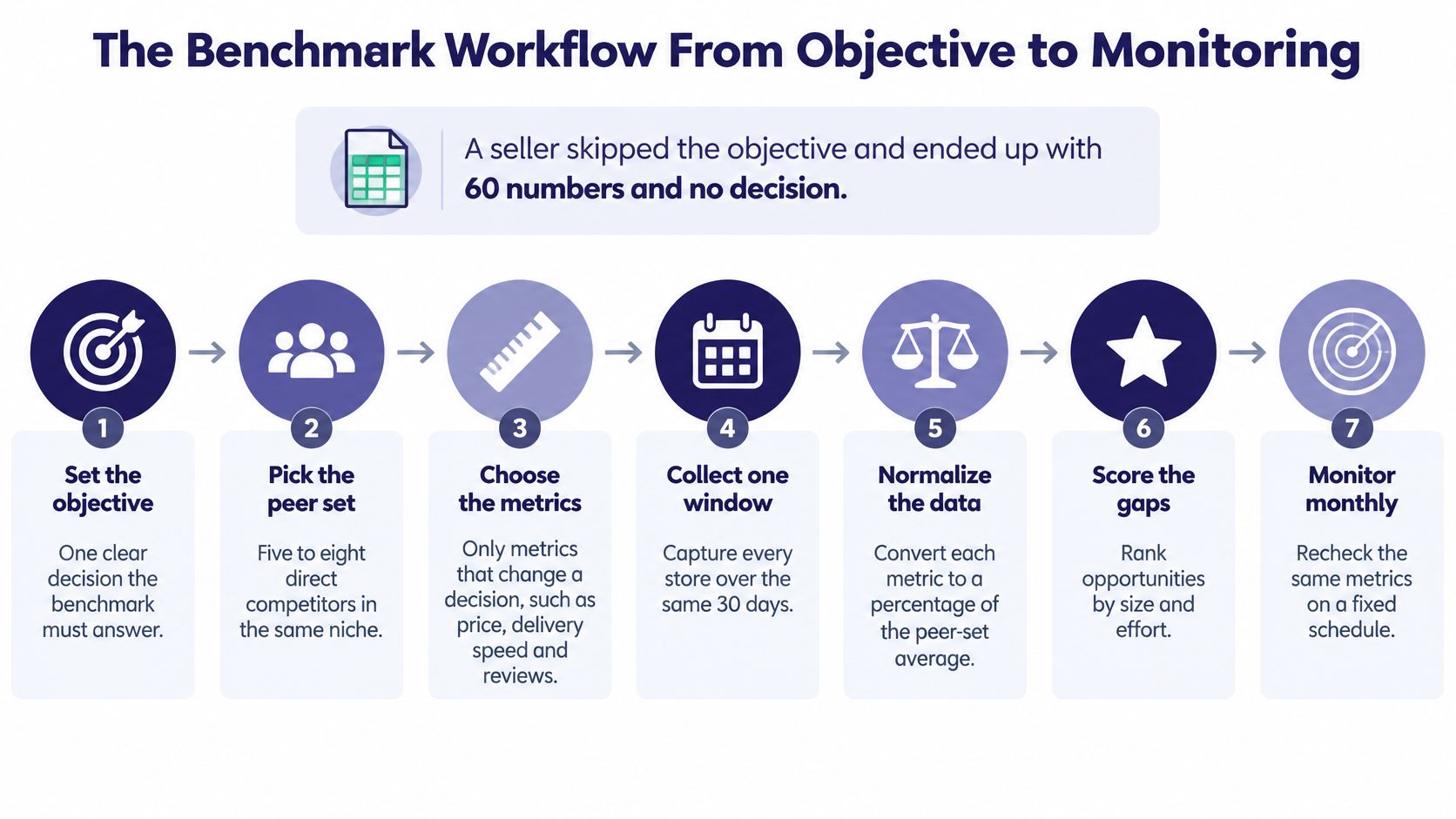
Here's the workflow I use. Each stage leaves behind one artifact, so the research can be checked and repeated.
- Set the objective. Name one decision the benchmark must support, such as whether to enter a niche, test a design, or change a price. Output: a decision statement.
- Choose a peer set. Select comparable active sellers, not just the biggest names in search. Output: a peer list.
- Record demand metrics. Capture the same defined indicators for each seller in the same observation window. Output: a metrics sheet.
- Record price and costs. Log the relevant price and fee inputs separately. Output: a fee sheet.
- Check risk. Note trademark, design, and marketplace-policy concerns before interpreting a gap. Output: a risk log.
- Normalize and score. Put comparable observations on a shared scale, then link the score to a decision rule. Output: a scored niche table.
- Schedule monitoring. Choose a cadence and preserve the same fields for future checks. Output: a monitoring calendar.
A first pass on one niche usually takes a few hours. Most of that time goes to verification, not copying figures into a sheet. That's useful effort: a number without a consistent definition, date, or marketplace can make a weak opportunity look strong.
The rest of this article follows that sequence, from setting the decision to repeating the benchmark.
Set the Decision and Pick Your Peer Set
Start by writing the decision rule before collecting competitor data. Choose the outcome you're evaluating: enter, avoid, test, pause, or raise price. Then name the small set of measures that could actually change that outcome.
For example, an “enter” decision might depend on evidence that several sellers have niche-relevant bestsellers, that their designs aren't all near-identical, and that your likely net margin is workable. A “raise price” decision needs a different comparison, especially the price range for equivalent products and your own cost structure. Don't track a measure just because it's visible.
Build the peer set around substitution
A competitor belongs in the benchmark when the same buyer might reasonably choose that seller's product instead of yours. Use these checks:
- Same product and buyer: The seller offers the same product type to the audience you're targeting.
- Usable marketplace: The seller operates somewhere you could also list, so the comparison can inform a real choice.
- Catalogue evidence: The seller has more than one relevant design; a single standout listing shouldn't define the whole shop.
- Recent activity: The store appears active in the last 30 days, based on what you can observe publicly.
- A useful mix: Include one large store, two mid-size stores, and two small active stores to avoid treating scale as the only model.
- Exclude borrowed audiences: Brand-driven and celebrity-driven sellers may have demand you can't reproduce with a new POD listing.
Suppose I'm testing a vintage fishing-dad niche. I might select three Redbubble mug shops and two Etsy shirt shops, provided they target the same buyer and sell the same theme. I'd record the marketplace and observation date beside each seller, because price and visible activity can vary across platforms and over time.
A practical way to build the list is store-first: find relevant sellers, then inspect each seller's top designs instead of relying on a handful of random search results. A spreadsheet is enough for this stage. The important part is that every store has a reason for being in the peer set.
Demand Metrics to Record for Each Competitor
Demand is inferred from several imperfect public signals. No single count proves sales or future demand, so record what each measure captures and what can distort it.
| Metric | How to capture it | Edge case |
|---|---|---|
| Bestseller presence | Count how many of each seller's top three designs match the niche | One viral design can make a store look stronger than its catalogue |
| Listing count | Count live listings per store on the same day | Expired or stale listings inflate counts |
| Reviews and favourites | Record visible counts where the marketplace shows them | Counts are cumulative and say little about the last 30 days |
| Tag overlap | List tags on each top design and count shared terms | Heavy tagging shows effort, not demand |
| Design saturation | Count near-identical designs across the whole peer set | Saturation matters most when the same buyer sees all of them |
| Estimated sales | Use one named estimation source and label the figure as an estimate | Small samples swing widely; never blend sources silently |
| Rank volatility | Note how often a design changes position across snapshots | One snapshot is a sample, not a trend |
Collect comparable observations
For each seller, record the top three designs and the date you saw them. Count the store's live listings, list the visible tags on those top designs, and note repeated design patterns across the peer set. If you track position changes, take snapshots using the same method and write down when each was captured.
A viral design is a common trap: it may prove that one product attracted attention, but it doesn't show that the seller's catalogue has broad demand. Etsy adds another wrinkle. Listings expire after four months, so a visible count can include listings that aren't current evidence of a live opportunity. Record what you observe rather than assuming every listed product is active or selling.
Search rank is not demand. A rank is one observation affected by the marketplace and the moment you checked. More results don't mean better evidence, either. If you want to explore seller-led examples, use this guide to best-selling Merch by Amazon shirts as a starting point, then verify the listings and dates yourself.
By the end of the day, your sheet should have one row per seller, with date and marketplace in the first two columns. Capture only information a listing shows publicly. Don't log into other sellers' accounts, and check each marketplace's terms before automated collection. If you add estimated sales, keep the named source and its date in the sheet so the next reader can judge how much weight to give the figure.
Price, Fees and Margin Across Marketplaces
A displayed retail price isn't profit. Two competitors can show the same price and leave very different amounts after platform charges, manufacturing costs, shipping, and the artist's markup are accounted for.
| Marketplace | Price to record | Cost layers to subtract | Example |
|---|---|---|---|
| Etsy | Item price plus shipping | $0.20 per listing; 6.5% of the order total | A $25 item with $5 shipping gives a $1.95 transaction fee before other costs |
| Redbubble | Displayed price and product type | Base price covers marketplace and manufacturing; artist markup defaults to 10% | Record the markup you can see; retail price alone doesn't show earnings |
| Merch by Amazon | Displayed price | Verify the royalty or fee details for the product and terms | Record the price and mark royalty fields you can't verify as unknown |
| TeePublic | Displayed price | Verify the applicable fee details | Record the price and mark fee fields as unknown until verified |
Etsy's fee structure makes the difference between price and margin clear. Etsy charges $0.20 USD per listing, whether or not the item sells, and listings expire after four months. A sale also incurs a 6.5% transaction fee on the total order amount, including shipping and gift wrapping when those charges apply. For a $25 item with $5 shipping, the fee base is $30 and the transaction fee is $1.95, before payment-processing fees, advertising, taxes, or production expenses (Etsy's seller fee policy).
On Redbubble, the displayed retail price combines a base price, which includes marketplace and third-party manufacturing costs, with the artist's margin. Redbubble says the default markup is 10%, though artists can change it. The visible price therefore doesn't tell you what the artist earns.
For Merch by Amazon and TeePublic, record the displayed price and don't invent a royalty or fee amount you can't verify. If you're comparing product offers or testing bundles, keep the price structure transparent, as in this guide to creating product bundles.
For each competitor, calculate net per sale only when the inputs are known. Compare the median and range of equivalent top-seller prices, not one store's standout listing or a single average. Two competitors at $24.99 may have different net results once shipping, markup, and production costs are separated. Flag any unknown input before using the row to make a launch decision.
Design, Trademark and Policy Checks Before You Trust a Gap
A phrase can be commercially popular and still be legally risky. Bestseller visibility doesn't establish that a phrase is safe to put on merchandise, so I treat rights checks as a gate, not as a score that strong demand can outweigh.
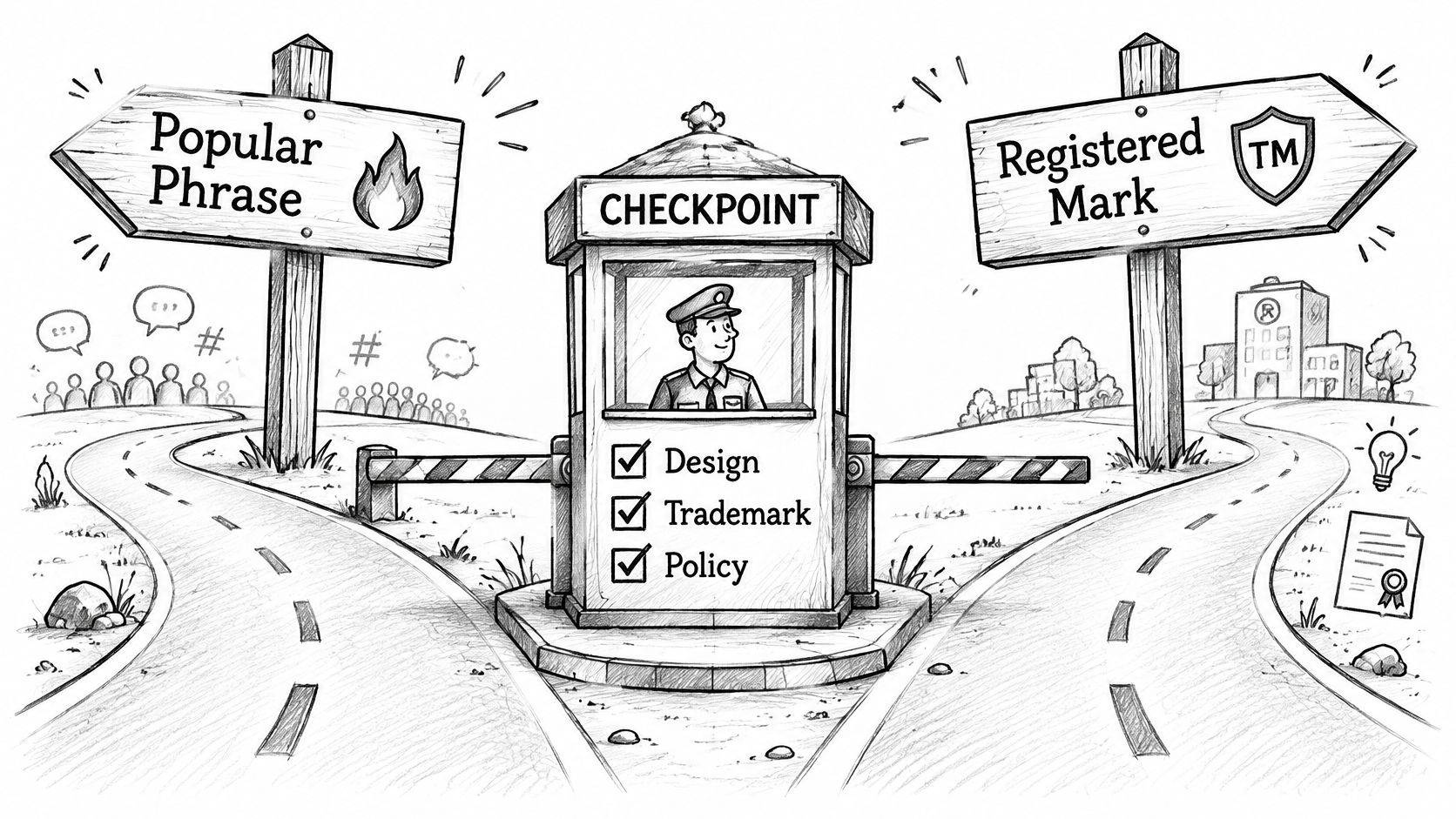
A USPTO database search can help identify federally registered marks and prior pending applications, but it's only part of a broader likelihood-of-confusion search. The USPTO also describes searching beyond its federal database, including the wider internet (USPTO trademark guidance). Use the current federal trademark search tool, since older guides may refer to TESS, and record which tool you used.
- Search the exact wording. Note the mark, owner, and status where available.
- Search similar wording. Try spelling variants and phrases that sound or look alike.
- Check related goods and services. A phrase used for different products may still need closer review.
- Search the wider internet. Look for uses that may not appear in the federal database.
- Save the result and date. Keep the query, tool, date, and notes with the niche record.
A database result isn't a legal clearance opinion. If a phrase matters to a larger launch, ask a qualified attorney to assess it rather than treating an initial search as a guarantee.
Record the creative and platform risks
A useful benchmark also describes what the competing designs really do. Note style, colour count, text versus illustration, and placement. Those details help explain a design gap, such as a niche where most top listings use plain text while a particular illustration style appears less common.
For Amazon Merch, exclude designs that appear to breach content rules or use Amazon intellectual property without permission. Its terms require submitted content to comply with applicable policies and intellectual-property law, and identify prohibited content categories including pornographic, libelous, defamatory, tortious, obscene, and racially, ethnically, or otherwise objectionable material (Amazon Merch on Demand content terms). Celebrity likenesses, brand logos, and copyrighted characters also deserve careful review.
A tool such as Trendlytic can run keywords against its USPTO trademark index, but I'd still review each hit and keep the result date in the risk log. Exclude a design from the opportunity benchmark if it presents an unresolved rights or policy risk, regardless of how attractive the demand signals look.
Here's a short explanation of how trademark searching fits into product research:
Normalizing Data and Turning Gaps Into Opportunity Scores
Raw numbers aren't comparable until they share a window, marketplace, and unit. A listing count from one platform can't be read as equivalent to another platform's count, and a price snapshot from one day shouldn't be compared with a figure collected during a different period.
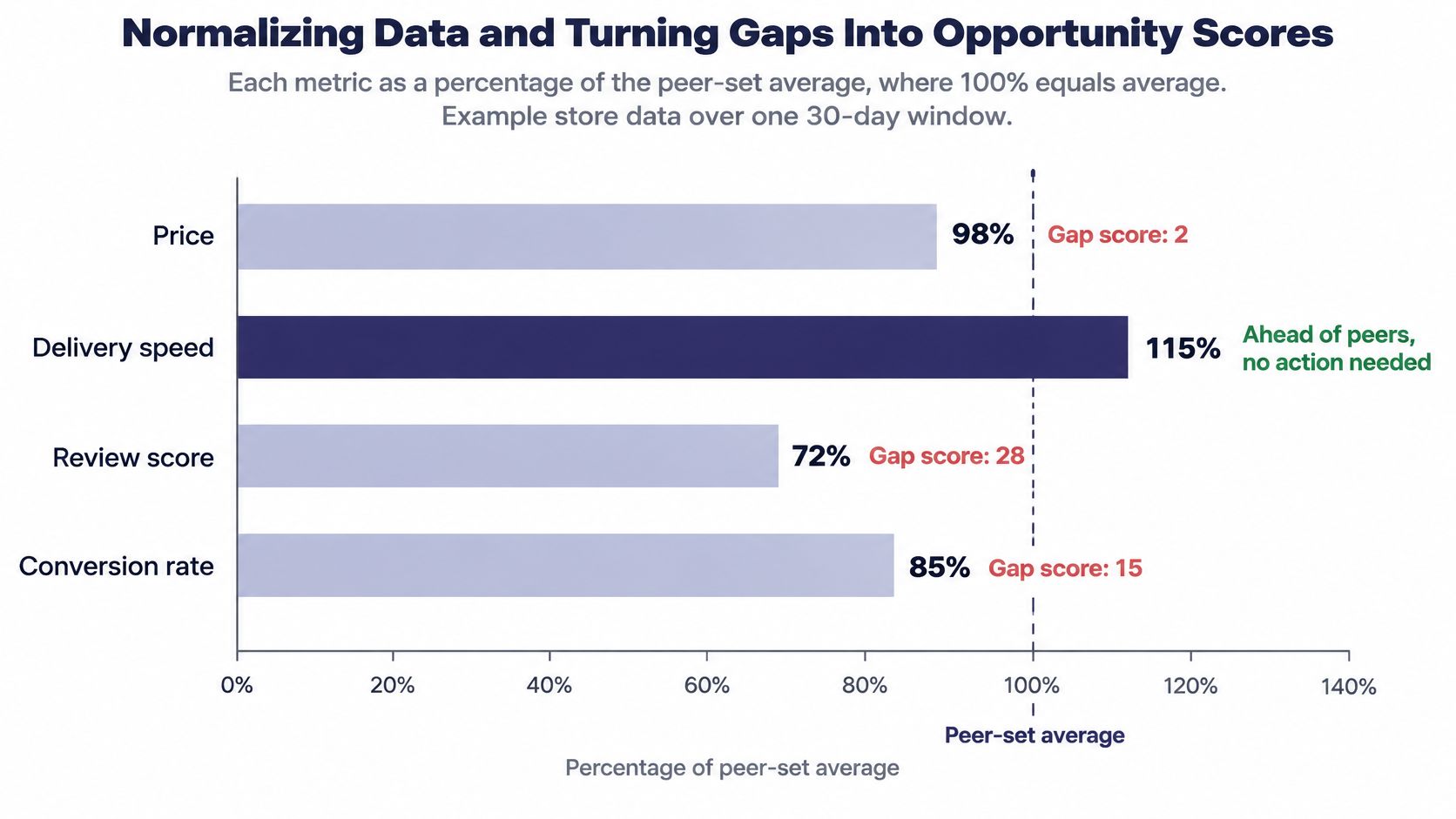
For metrics that can be compared, convert each observation to a percentage of the peer-set maximum or map it to a consistent 0–100 scale. Keep the direction clear: a high score can mean strong evidence for demand, while a high saturation score may be a warning. The method needs to be consistent across the table, not cosmetically neat.
The chart below shows a normalized example of store metrics against a peer-set average of 100%. It's a way to spot gaps, not a claim about a real store's performance.
Keep the score tied to a decision
A simple Opportunity Score can combine five inputs: demand evidence weighted at 30, competition at 25, net margin at 20, design gap at 15, and data confidence at 10. A failed rights check sets the score to zero. These weights are a working model, not a universal formula, so write down how you score each input before comparing niches.
Use a clear action rule: 70 or above, test; 50–69, watch; below 50, avoid. Then calculate the absolute gap against the strongest competitor and the percentage gap where the underlying metric supports it. The score should lead to a specific action, owner, and date, not sit alone in a report.
| Niche | Proven top sellers | Median price | Saturation | Opportunity Score | Action |
|---|---|---|---|---|---|
| Retro cat dad | 3 of 3 | Not specified | Low | 74 | Test two designs this month |
| Campus camping humour | 1 of 3 | Not specified | Medium | 58 | Watch for two more weeks |
| Generic hustle quotes | 3 of 3 | Not specified | High | 38 | Avoid; saturated |
These are illustrative values, not measured data. Read the first row as a reason to test two designs, not proof that buyers will purchase them. A higher score only tells me that, given the chosen inputs and weights, the niche deserves a controlled test. For a scoring structure you can adapt, see this guide to competition scoring.
Limit the scorecard to five or six inputs. More metrics often blur the decision by giving weak signals equal room with useful ones. A bar chart for each metric is usually enough to show where a niche sits against its peer set; write one action beside every gap that matters.
Set Up Monthly Monitoring Before You Launch
A benchmark is a repeatable process, not a one-off survey. Keep the fields and definitions stable so a later check can be compared with the first one.
- Weekly: Check the peer set's top designs and rank changes for the niche. Write down what moved and when you observed it.
- Monthly: Run the full scorecard again using the same fields in the same order.
- Quarterly: Review the peer set itself, since sellers can enter, leave, or change their catalogues.
Keep a dated changelog with a timestamp and source for each observation. Don't treat one before-and-after difference as proof that a new tag or price caused a result. Record the change, then wait for the next full run before drawing a conclusion.
A research tool can speed up snapshots and recordkeeping, but the sheet, definitions, and judgment still belong to you. For this week, pick one niche you already have a hypothesis about, set the objective and peer set, then run the seller and demand collection stages. Stop before acting on the result until the trademark check is done.
If you already use a research tool, compare its report against the same scorecard and note where the two disagree.
Trendlytic is a POD niche research tool covering TeePublic, Amazon Merch, Redbubble, and Etsy, with marketplace data and a built-in USPTO trademark check. If you want to compare its niche reports with the scorecard you've built, visit Trendlytic.