How to Find Niche Keywords for POD That Actually Sell
You've got a design idea, a few promising phrases, and perhaps a handful of listings that look busy in search. Then you spend hours creating mockups, upload everything, and discover that the niche is either too broad, crowded with established sellers, or tied to a phrase someone else has protected. That's a frustrating way to learn.
For POD, how to find niche keywords isn't really a blogging exercise. The keyword is usually a buyer identity, a hobby, a profession, an inside joke, or a tightly defined gift occasion that can become a design direction. The useful workflow starts with real stores, expands into buyer language, checks demand and competition, and ends with a trademark review before you put time into artwork.
Table of Contents
- Starting From a Real Sellable Niche Instead of a Guess
- Mining Ideation Sources POD Sellers Actually Use
- Turning Seed Phrases Into Validated Keyword Clusters
- Reading Demand and Competition Without Fooling Yourself
- Running the Trademark Check Before You Design Anything
- Testing, Reading Signals, and Scaling What Works
- A Repeatable Weekly Niche Research Workflow
Starting From a Real Sellable Niche Instead of a Guess
Most sellers begin by typing a broad topic into Etsy and copying autocomplete suggestions. That can produce useful phrases, but it rarely tells you whether the phrase represents a viable design niche. Search suggestions show language. They don't automatically show a coherent audience, a repeatable visual style, or a realistic path to several related products.
I start with stores. Browse bestseller areas on Etsy, Redbubble, TeePublic, and Amazon Merch, then record patterns instead of isolated listings. Look for phrases appearing across multiple sellers, recurring occupations or hobbies, and design treatments that buyers seem to recognize. A single funny shirt may be a novelty. A group of sellers repeatedly serving the same audience is a stronger signal.
Take retro veterinary tech shirts. “Veterinary” is too broad for a first design brief. “Vet tech” narrows the identity, but it still leaves many directions open. After reviewing store patterns, you might define the audience as veterinary technicians who like nostalgic typography, clinic humor, and giftable apparel for colleagues or newly qualified professionals.
That definition changes the research. You're no longer asking, “What keywords relate to animals?” You're asking which phrases this audience uses when looking for apparel, gifts, and identity-based designs.
Practical rule: Treat a bestseller store as evidence of a buying audience, not proof that every phrase used by that store will work for you.
A store-first approach also helps you avoid copying a surface trend. If several sellers use similar veterinary technician themes, study the sub-niches underneath them. Graduation gifts, work humor, animal-specific roles, and retro clinic aesthetics can become separate keyword clusters. For broader niche brainstorming beyond POD, the guide to profitable YouTube channel ideas can also help you think in terms of audiences and recurring interests rather than isolated topics.
The output of this first pass should be a short audience description and a few search directions. You haven't chosen your final product yet. You've reduced the chance of designing for an audience that exists only in your imagination.
Mining Ideation Sources POD Sellers Actually Use
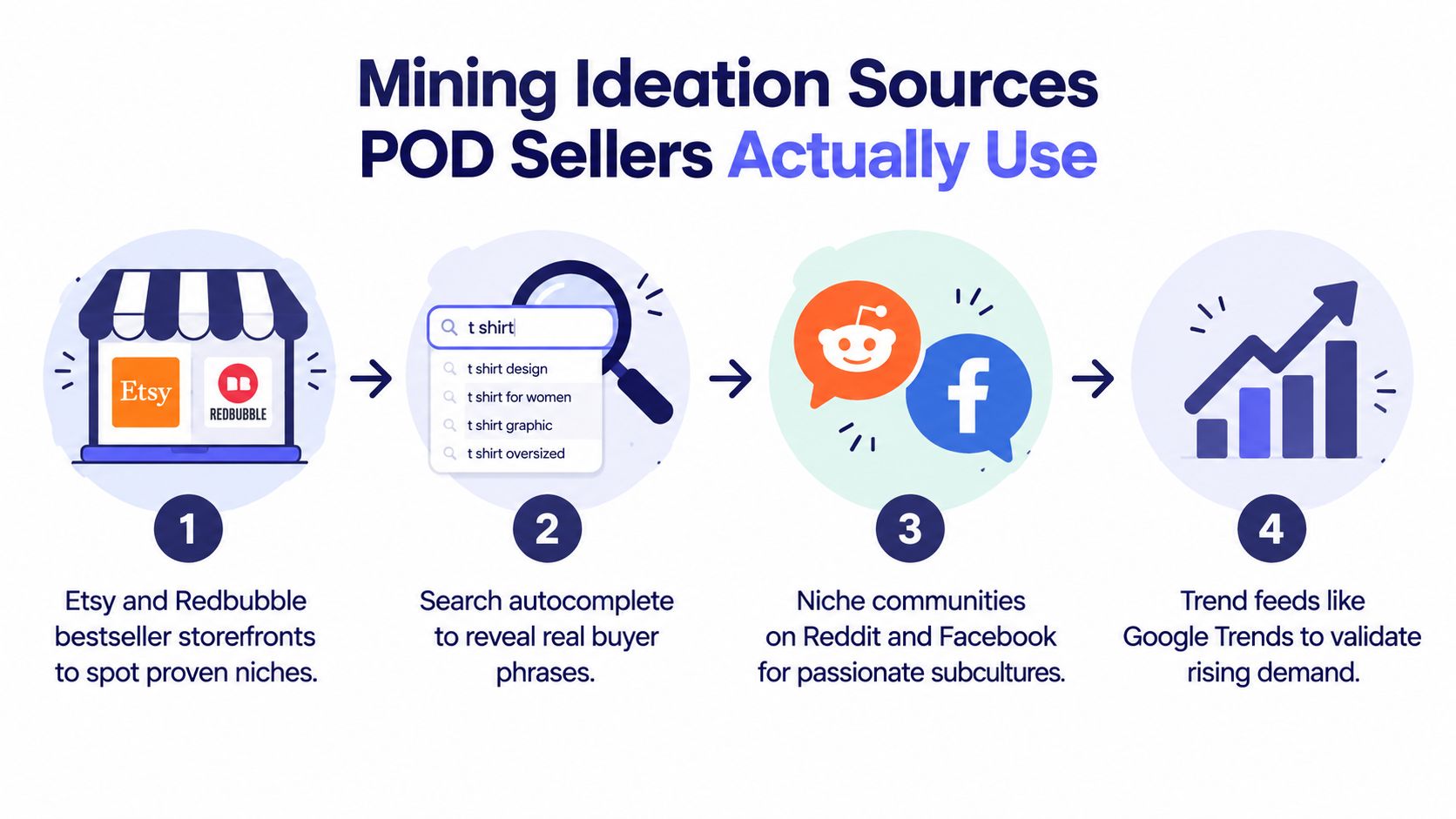
Good niche ideas rarely come from one source. I use several sources because each exposes a different part of buyer behavior. Storefronts reveal what sellers have already packaged, autocomplete reveals search language, communities reveal how people talk, and trend feeds help distinguish a current angle from a flat one.
Start with bestseller storefronts
Open a relevant category or search result on Etsy or Redbubble and inspect the stores behind recurring designs. Don't just save the top image. Note the phrases, audience labels, color choices, illustration style, and product types that repeat across a seller's catalog.
For example, if several stores feature veterinary technician humor, record whether their strongest ideas focus on clinic life, animal handling, graduation, or gifts for coworkers. A phrase such as “vet tech life” may suggest identity apparel, while “veterinary technician gifts” points toward a buyer shopping for someone else.
Use autocomplete as a language recorder
Type partial phrases into Etsy, Amazon, and TeePublic. Try combinations such as “veterinary technician,” “vet tech gift,” and “retro vet.” Record the longer suggestions rather than stopping at the broadest phrase.
Autocomplete can surface a phrase like “veterinary technician gifts”, which says more about purchase intent than “veterinary.” Repeat the process with different word orders and product terms. The aim isn't to accept every suggestion. It's to collect the vocabulary buyers already use.
For a marketplace-specific workflow, the Etsy trend search guide offers a useful reference point for examining Etsy demand signals.
Read communities for unpolished wording
Reddit and Facebook groups often contain language that never appears in keyword tools. Search communities for posts from new veterinary technicians, breed-specific dog owners, or people discussing workplace humor. Look at titles, comments, and repeated expressions.
A subreddit thread might use “vettech life” as a casual identity phrase. That wording could become a shirt concept even if it isn't the clearest gift keyword. Community language is especially useful for slogans, insider references, and design tone.
Use trend feeds as a filter
Google Trends and Pinterest can help you compare whether an idea is gaining attention, holding steady, or fading. Search related variations instead of relying on one phrase. A Pinterest trend around retro clinic graphics, for example, may support a visual direction that pairs with the veterinary technician audience you found in stores.
Trend data shouldn't overrule marketplace evidence. A rising topic with no clear product behavior may be content interest rather than buying intent. Use trend feeds to choose between plausible angles, not to manufacture a niche from a graph.
Embed the video only after you've collected a few phrases and themes. It's more useful when you can compare its workflow against your own notes.
Turning Seed Phrases Into Validated Keyword Clusters
A seed phrase is a doorway, not a finished niche. “Veterinary technician gifts” can expand into identity phrases, product phrases, occasions, and audience-specific variations. The useful question is whether each variation has a clear buyer and a plausible design application.
Start by changing the length and intent. Broad phrases can reveal the size of an audience, medium phrases connect the audience to a product, and longer phrases often clarify who is buying and why. Search demand has a strong long-tail structure. In a study of 306 million U.S. keywords, 91.8% were classified as long-tail terms with 1 to 100 monthly searches, while those terms represented 3.3% of total search volume and had a median volume of 10 searches per month. The Backlinko Google keyword study supports the practical reason to build clusters instead of chasing one head term.
Here's how I'd filter the veterinary technician example:
| Phrase | Length | Intent | Platform Fit | Keep or Drop |
|---|---|---|---|---|
| vet tech | Short | Identity | TeePublic, Redbubble | Keep as a broad seed |
| funny vet tech shirts | Medium | Product and humor | Etsy, TeePublic | Keep |
| veterinary technician gifts | Medium | Gift purchase | Etsy | Keep |
| veterinary technician graduation gift for her | Long | Occasion and recipient | Etsy | Keep |
| retro veterinary tech shirt | Medium | Style and product | Etsy, Redbubble | Keep |
| animal clinic | Short | General topic | All platforms | Drop as too broad |
| branded veterinary program name | Medium | Institution identity | Risky across platforms | Drop if trademark results appear |
| random vet tech phrase with no suggestions | Long | Unclear | Weak platform fit | Drop |
Platform context matters. Etsy often rewards descriptive gift-style phrasing because shoppers explain what they're buying. TeePublic tends to suit identity, fandom, and expressive phrases. Amazon can favor clear product and audience language. The same design can use different metadata emphasis on each platform.
Drop weak variants early. Anything generic, legally questionable, or unsupported by autocomplete on at least two platforms deserves scrutiny before design work. If you want a deeper explanation of how to build pages from keyword clusters, the same grouping logic applies here, even though your final output is a product catalog rather than a blog.
A cluster is a test batch, not a promise that every phrase belongs on a separate listing.
Reading Demand and Competition Without Fooling Yourself
Demand and competition are related, but they aren't interchangeable. A niche can have visible interest and still be difficult to enter. It can also look small while offering a clean audience, clear product intent, and enough room for several designs.
For demand, I look at monthly search volume, Etsy sale-result counts, Amazon bestseller ranks, Pinterest saves, and the shape of a Google Trends curve over the last twelve months. None of these signals deserves automatic priority. Search volume helps estimate interest, while Etsy sales and Amazon rankings are closer to marketplace behavior. Pinterest can reveal visual interest, and a trend curve can show whether the idea is rising or fading.
For competition, check listing counts, review velocity among top sellers, how many shops dominate the first page, the average price floor, and the variety of designs already available. A crowded result with many shops selling nearly identical artwork is more difficult than a result with similar listing counts but varied buyer angles.
A simple decision matrix
| Quadrant | Demand | Competition | Action |
|---|---|---|---|
| Ride the Wave | Strong or rising | Manageable | Test quickly with a narrow angle |
| Blue Ocean | Modest but clear | Low | Build a focused cluster |
| Slow Burn | Modest or seasonal | Moderate | Test only with a strong design hook |
| Skip | Weak or unclear | High | Keep researching |
Opportunity Scores can compress several signals into one number, but the number is only useful when you understand what sits underneath it. Tools generally combine demand indicators with competition indicators, then weight them into a decision score. That makes sorting easier, not thinking unnecessary.
A 60 score on a small, clearly defined niche can be more useful than an 85 score on a broad, muddy topic. The first may tell you exactly who to design for. The second may combine large interest with difficult competition and weak purchase intent. The competition scoring workflow is helpful for seeing how this kind of evaluation can be organized.
A score should narrow your shortlist, not make the decision for you.
When I have a long list, I select the top three niches that combine clear audience identity, visible product intent, manageable competition, and a design direction I can repeat. I don't choose three variations of the same broad idea. I choose three distinct tests so the results teach me something.
Running the Trademark Check Before You Design Anything
Trademark research belongs before the artwork, not after the listing is live. A phrase can look harmless in search results and still create problems when it's used on clothing, especially if a business has an active or pending right covering the relevant goods.
Start with the live USPTO search system. Use the free-text search for the wordmark, then check similar spellings and phonetic matches. For logos or visual symbols, consult the USPTO Design Search Code Library and search relevant design categories rather than relying only on the wording.

A clean result doesn't mean “no identical phrase appeared.” Review the status, owner, goods and services, filing basis, and similarity of the mark. A dangerous result may be a phonetic match, an entry on the Supplemental Register, or a live pending application. Pay particular attention to class 025, which covers clothing and can be directly relevant to POD apparel.
Consider “Sunny Vibes Coffee.” A basic search might seem reassuring if no identical live registration is obvious. A closer review could surface a Section 1(a) pending application with related goods. That doesn't automatically settle the legal question, but it's enough reason to stop, investigate further, or choose a different phrase.
My pre-design clearance checklist
- Search variations: Check spacing, plurals, abbreviations, alternate spellings, and phonetic similarities.
- Review status: Separate dead records from live registrations and pending applications.
- Inspect goods: Confirm whether clothing or related merchandise appears in the identification.
- Check common law use: Search marketplaces, business directories, websites, and social platforms for unregistered commercial use.
- Consider geography: Rights and enforcement can extend beyond the result you first find, especially if you sell internationally.
- Recheck later: Clearance today doesn't guarantee clearance next year.
This isn't a substitute for legal advice. It's a practical screening step that prevents obvious problems from entering your design pipeline. Sellers working on marketplace protection can also review trademark protection for Merch by Amazon before publishing a phrase.
Testing, Reading Signals, and Scaling What Works
A niche test should be small enough to run without draining your catalog and controlled enough to produce a useful signal. I'd launch five to eight tightly themed designs per niche across two platforms, keeping the initial titles, tags, and mockups as consistent as practical. That isolates the niche variable instead of changing the audience, presentation, and metadata all at once.
The designs shouldn't be duplicates. Use one cluster around workplace humor, another around gift intent, and a third around the visual style you identified in research. For veterinary technicians, that might mean a retro identity shirt, a graduation gift, and a clinic inside joke, all aimed at the same defined audience.
Read each platform on its own terms
Use a simple observation window:
- Day 3: Look for favorites and early engagement.
- Day 7: Review impressions and click-through behavior.
- Day 14: Check sales or saves.
- Day 30: Compare revenue per design.
These dates aren't guarantees. They're checkpoints that stop you from changing everything every morning. If a design gets attention but no purchases, the issue may be the product, price, mockup, or offer rather than the niche.
Etsy stats can show listing views, visits, favorites, and sales behavior. Amazon BSR is a ranking signal, not a substitute for the rest of your test data. Redbubble favorites indicate engagement, but they don't mean the same thing as an Etsy purchase. Don't combine these signals into one fake total.
A practical decision rule is straightforward. Three or more sales or a strong save rate by day 14 means scale the angle. A plateau means revise the design, title, or presentation before abandoning the audience. Zero traction by day 30 means abandon the niche or return to research, unless you have a specific reason to believe the listing was suppressed or poorly distributed.
When scaling, duplicate only the winning concept with meaningful variations. Add a second design cluster when the first has shown repeatable interest, not because you've run out of ideas. Keep paid promotion controlled, and don't spend behind a listing that hasn't earned organic engagement.
A Repeatable Weekly Niche Research Workflow
Niche research works better as a weekly habit than as a frantic session whenever sales slow down. The schedule below keeps discovery, validation, legal review, and design production connected.
Monday
Spend 20 minutes scanning Etsy bestsellers, Amazon Movers and Shakers, and Redbubble rising tabs. Save recurring audience themes, not just attractive graphics. Note any phrase that appears across stores or products.
Tuesday
Harvest 30 phrases from autocomplete and community threads. Search Etsy, Amazon, and TeePublic, then read Reddit and Facebook discussions for the language buyers use naturally. Separate identity phrases from gift phrases and product phrases.
Wednesday
Cluster the phrases by audience, occasion, style, and platform. Remove generic terms, unclear variants, and phrases that don't fit the design direction. Compare the clusters using the demand and competition signals from the earlier workflow.
Thursday
Run the USPTO check, inspect marketplace saturation, and review possible common-law conflicts. A simple spreadsheet is enough if it records the phrase, platform, intent, trademark status, and next action. A structured Crescade AI SEO workflow can provide ideas for organizing repeatable research tasks, but it shouldn't replace your judgment.
Friday
Upload a five to ten design test batch built around one tightly defined cluster. Keep notes on titles, tags, mockups, dates, and platform results so you can compare tests.
Niches decay. A phrase that worked in spring may feel cold by autumn, and a design style can lose relevance even when the audience remains active. Revisit saved clusters monthly and prune anything that has stalled for 60 days.
The right tool should serve this rhythm rather than replace it. Trendlytic fits when you want one workspace to inspect bestseller data across TeePublic, Amazon Merch, Redbubble, and Etsy, pull tags and long-tail phrases from proven designs, compare demand and competition, and run a built-in USPTO trademark check. It's useful as a consolidation layer only when you still review the audience, design angle, and legal context yourself.
If you want to shorten the manual part of this workflow, visit Trendlytic to research POD niches across Etsy, Redbubble, TeePublic, and Amazon Merch, with store-first bestseller analysis and trademark checks in the same process. Use it to build a shortlist, then validate the shortlist with your own design judgment before you publish.