Merch by Amazon Print on Demand: How It Works for Sellers
A folder of shirt ideas is ready, but you don't want to store blank tees or guess whether your designs will sell. Merch by Amazon print on demand offers a way to test original artwork without holding inventory.
Merch by Amazon works by splitting responsibilities between the creator and Amazon. You choose a niche, create the artwork, set the price, attract traffic, and follow the program's rules. Amazon prints each item after an order, ships it, and handles customer service. You control the choices that shape a listing; Amazon takes over production and fulfillment after a sale.
Table of Contents
- What Merch by Amazon Print on Demand Is
- Eligibility and Onboarding Before Your First Upload
- Validating a Niche Before You Design a Batch
- Rights, Licensing and Trademark Checks
- Artwork Specs Amazon Expects Before Upload
- How the Print on Demand Workflow Runs, Step by Step
- How Royalty Groups Change Your Payout
- Common Pitfalls and How to Avoid Them
- Deciding Whether Merch by Amazon Fits Your Plan
What Merch by Amazon Print on Demand Is
Merch by Amazon print on demand is a program where you upload artwork, choose a product and a color, and earn a royalty when a customer buys it. Amazon prints the item, ships it, and handles customer service.
I picture it as a kitchen. You supply the recipe. Amazon runs the kitchen, delivers the meal, and deals with complaints. You get a share of each sale. That share isn't a wage, and it isn't a promise that the meal will sell.
Amazon introduced Merch on Demand in September 2015 as a royalty-based print-on-demand program. Creators submitted artwork for products such as T-shirts, while Amazon handled manufacturing, fulfillment, and customer service. The royalty came from the list price after Amazon's costs and a small listing fee. Amazon also described a volume idea: as sales rose and operating expenses fell, a larger share of the economics could come back through higher royalties. Sellers didn't buy blank garments, hold stock, or run their own fulfillment.
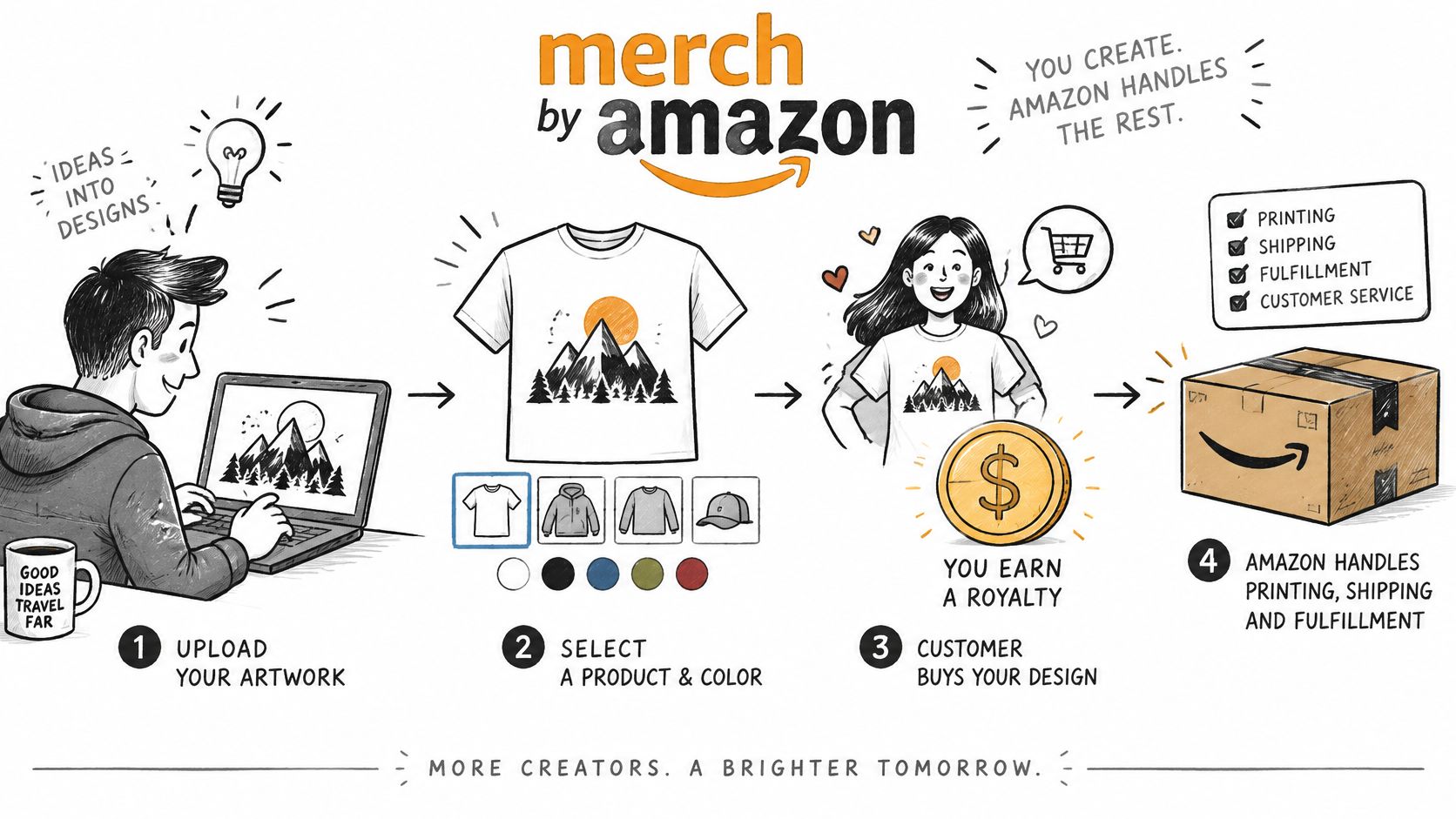
What you control is original artwork, product selection, pricing, traffic, and compliance. What Amazon controls is manufacturing, logistics, returns, and support. The current public description still says there are no upfront costs, and that Amazon creates the product page, produces the item, ships it, and manages customer service.
Before any of that happens, the account has to be ready.
Eligibility and Onboarding Before Your First Upload
Eligibility, market availability, and onboarding steps change. Confirm the current requirements on Amazon's Merch by Amazon pages before you plan around them. The U.S. royalty rules later in this guide don't automatically apply in every store.
Work the checklist in order.
- Check the country and the marketplace. The program has to be open where you live and in the store you plan to sell in. A rule written for the U.S. store can be a different rule elsewhere.
- Use one Amazon account you can keep in good standing. A suspension hits every listing tied to that account, not just the design that caused the problem.
- Prepare tax and payment details. Royalties are paid through the account, so a missing payout method means a sale that doesn't reach you.
- Finish any identity check the portal asks for. Designing first, then discovering the account is still locked, wastes the evening.
- Read the content guidelines and program policies before you upload. A design you already love is harder to kill than one you haven't drawn yet.
Practical rule: Finish this checklist and confirm the portal's current requirements before you pay for design software or stock assets.
Rights records and a small test batch come after the account is open.
Validating a Niche Before You Design a Batch
Most weak batches start with a niche I picked because I liked it. I test demand before I draw anything. A feeling isn't a buyer.
- Name a specific buyer and a specific phrase. A job, a hobby, or an event beats a broad word like cats or coffee. "Night-shift nurse, coffee at 3 a.m." is a buyer. "Coffee" is a category.
- Search that phrase on each marketplace you plan to use. Count how many listings already use it, and note how many look recent. A wall of fresh listings is a different problem from a handful of old ones.
- Read the public signals the platform shows. Rankings or review counts, where you can see them, are rough indicators. They aren't sales figures, so don't treat a badge as a unit count.
- Compare the same phrase across print-on-demand marketplaces. A phrase that looks open on one site can be crowded on another. I use the same wording on TeePublic, Amazon Merch, Redbubble, and Etsy before I commit. A walk-through of how to find high-demand, low-competition products on Amazon is a useful companion to that manual pass.
- Set a test batch of three to five designs and a review date before you publish. The date stops you from adding twenty more shirts because the first week feels quiet.
Trendlytic is a POD niche research tool covering TeePublic, Amazon Merch, Redbubble, and Etsy, so you can compare a phrase across those marketplaces, and it includes a built-in USPTO trademark check. I put that output next to my own sales notes. I don't let it replace them.
Research narrows the odds. It doesn't guarantee a sale. Trademark screening gets its own checklist next, because a popular phrase can still be someone else's mark.
Rights, Licensing and Trademark Checks
A common belief is that uploading means Amazon owns your design. That's not what the terms say.
The Merch by Amazon program terms describe the license Amazon receives as non-exclusive, royalty-free, perpetual, and irrevocable. Amazon may use, copy, distribute, publicly display, reproduce, edit, adapt, modify, translate, reformat, and create derivative works from a submission, and sublicense those rights as the law allows. Those are the permissions Amazon needs to run the program. They are not a transfer of every ownership interest in an original design you still hold.
What you need on your side is a paper trail.
- Keep original source files with dates. A flattened export is hard to defend if someone asks who made the art.
- Record who created each element and under what license. Fonts and stock images count. A "free" font with a personal-use license is a problem on a shirt you sell.
- Keep permission records for any third-party artwork, quotes, or names.
- Screen every title and phrase for trademarked names and brand references, including jokes that only work because they name a brand.
- Check the USPTO trademark records for the words you plan to print and the words you plan to put in the title.
Trendlytic's built-in USPTO trademark check is one input you can run on those words. It sits beside your own review. It isn't legal advice, and a clean check doesn't guarantee approval. You remain responsible for the content.
Third-party artwork, text, or recognizable brand references make these records more important if a rights dispute or a policy review follows. I keep one folder per design: source files, licenses, and the trademark check, together.
Artwork Specs Amazon Expects Before Upload
The file is where most of my technical mistakes show up, because Amazon prints only after the order, and a bad file still ships.
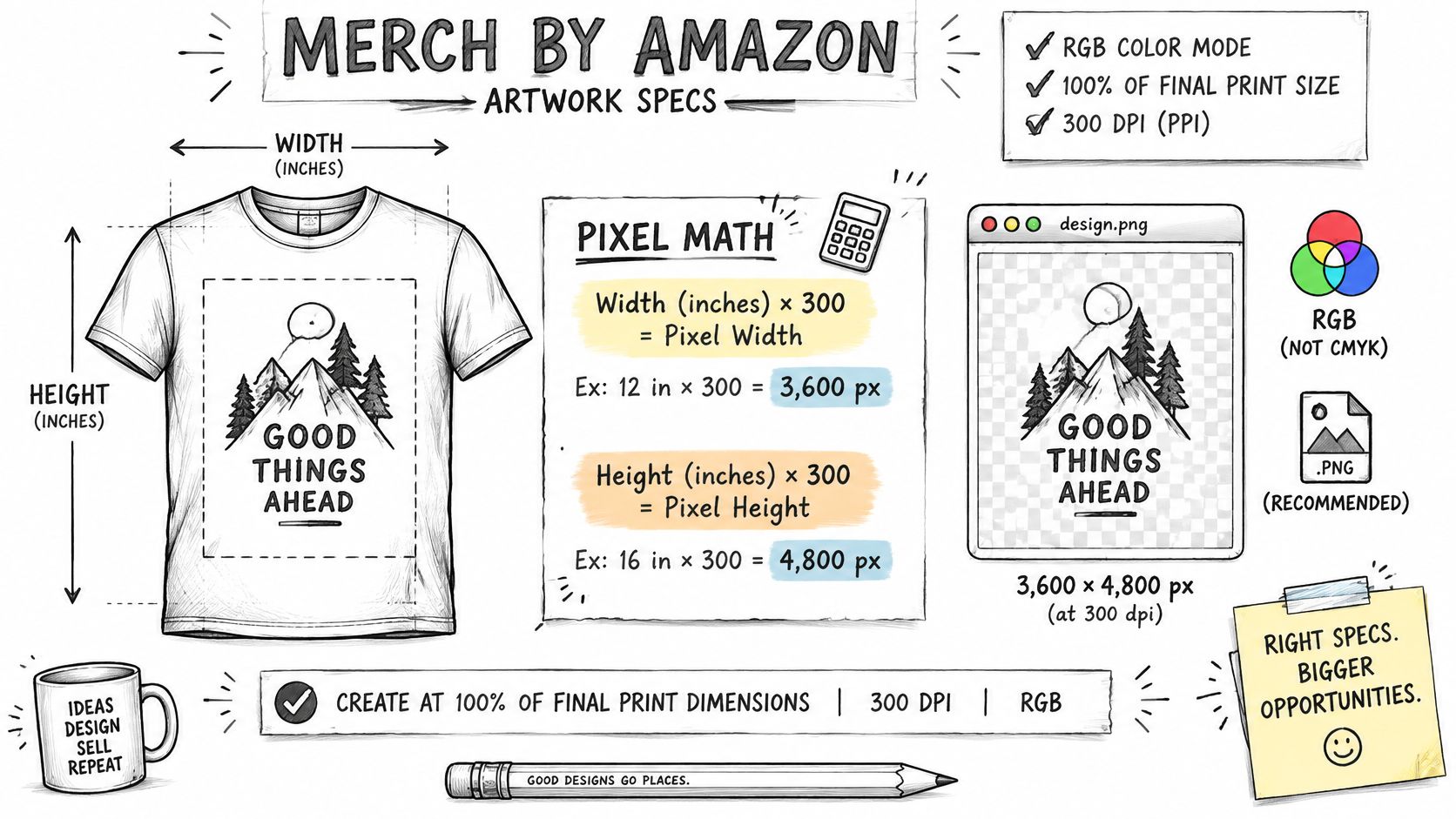
Amazon's production guidance asks for RGB artwork rendered at 100% of the final print dimensions and 300 dpi. That spec is what keeps edges sharp and color closer to what you drew when the file is rasterized. The pixel math is simple. Multiply each side in inches by 300. A 12-by-16-inch print area is 3,600 by 4,800 pixels.
| Print area | Dimensions (inches) | Pixels at 300 dpi | Check before upload |
|---|---|---|---|
| Small print | 8 x 10 | 2,400 x 3,000 | Confirm small text stays legible |
| Standard print | 12 x 16 | 3,600 x 4,800 | Use as the default master size |
| Large print | 16 x 20 | 4,800 x 6,000 | Check fine lines at full scale |
| Poster-size print | 18 x 24 | 5,400 x 7,200 | Confirm the file is still easy to manage |
These rows are calculations, not a substitute for the product page. Confirm the print area for that product type before you upload. The same habit shows up off Amazon too. If you later place the art on a shop you own, find Shopify product image dimensions from Photo Speak so the storefront file isn't a resized guess.
Build the file in this order
- Confirm the print area for the product you're uploading.
- Multiply each dimension by 300 and set the document to that pixel size.
- Work in RGB at the final size, not in a small RGB sketch you'll blow up later.
- Export in a file type the upload page accepts.
- Preview at actual size and read every word from a normal viewing distance.
A shirt layout often fails on a different format because the safe area changes. I keep the master file for every design, and I look at Merch by Amazon design choices when I'm deciding which product the art was built for. Content-policy problems are a separate risk: Amazon states that violations can lead to listing removal without notice, or to account suspension or termination.
A short walk-through of placing art on a product is easier to follow on screen than in a paragraph.
How the Print on Demand Workflow Runs, Step by Step
Once the file and the rights folder exist, the portal work is a short sequence. Each step has one job.
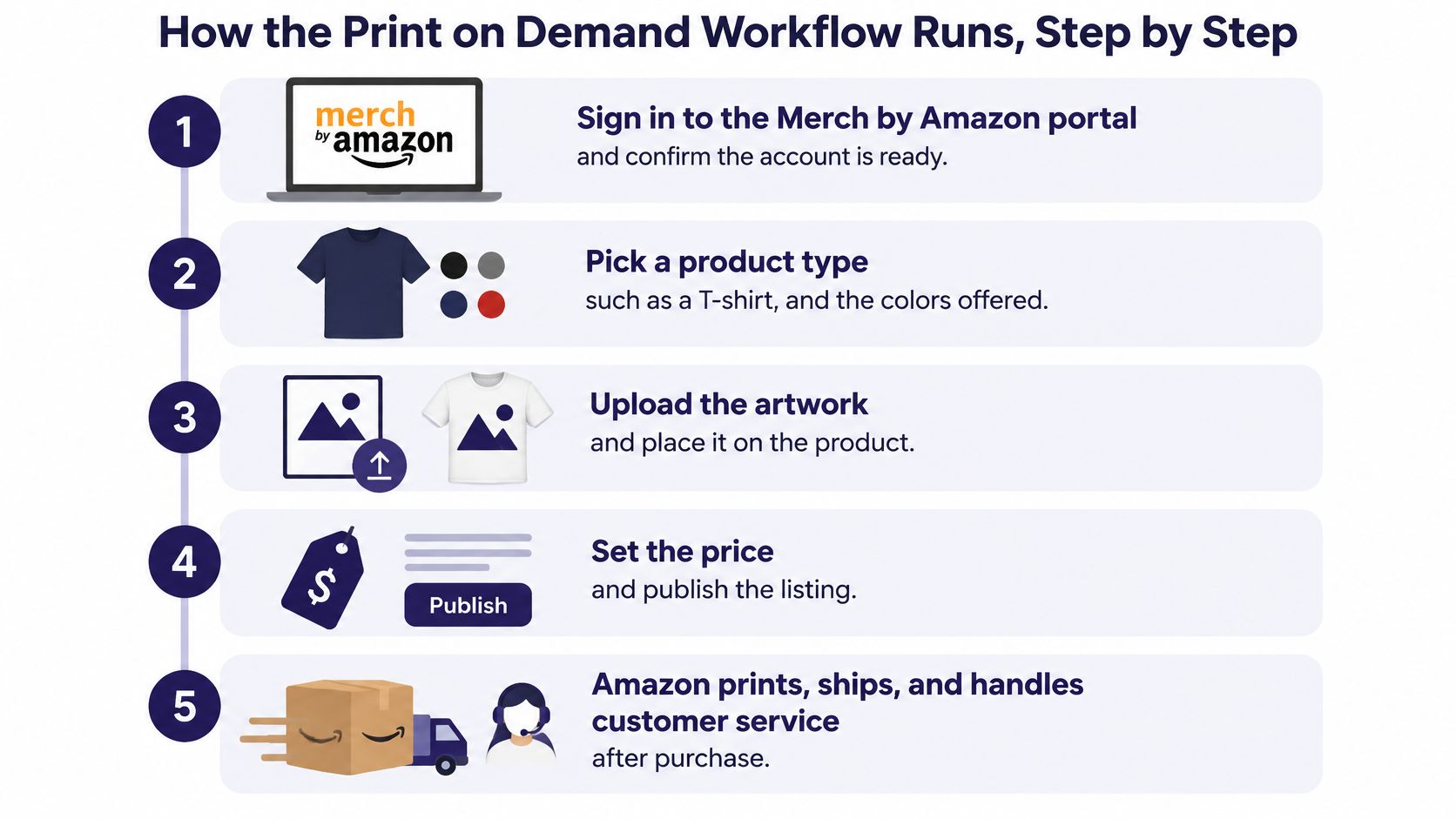
- Sign in and confirm the account is ready. A half-finished tax form stops the listing later, not now.
- Pick a product type and the colors offered. A dark shirt needs a different contrast plan than a white one.
- Upload the print-ready file. This is the file you already checked at full size, not a draft.
- Enter the title, bullet points, and keywords. Buyers and search both read this text, so it has to match the art.
- Set the price inside the allowed range. You're choosing the list price, not inventing a payout in dollars from it.
- Amazon creates the product page and publishes it. You don't build the storefront page yourself.
- A customer orders, and Amazon prints that single item after purchase. Nothing is made while the listing just sits there.
- Amazon ships the item, handles returns, and provides customer service.
- Royalties follow your royalty group. You receive them. Amazon calculates and pays them.
| Task | Seller | Amazon |
|---|---|---|
| Create artwork and check rights | Yes | No |
| Choose product types and colors | Yes | Offers the catalog |
| Write title, bullets, and keywords | Yes | Publishes the listing |
| Print each order | No | Yes, after purchase |
| Ship the item | No | Yes |
| Handle returns and customer service | No | Yes |
| Calculate and pay royalties | Receives royalties | Calculates and pays |
What I actually watch
I check listing status, sales by product, and the share of traffic I sent myself. One design can sit on several product types, and each listing needs its own preview, title, and price. A hoodie isn't a resized tee with the same sentence pasted in.
If the listing is live and the art is clean, the next lever you can still pull is traffic, not the printer.
How Royalty Groups Change Your Payout
A strong month can improve your royalty group, but one busy week does not guarantee a higher rate. For U.S. sales, Amazon places sellers in three groups based on monthly sales and the share of sales attributed to creator-driven traffic.
| Royalty group | Requirements (U.S. store) | Rate vs. Creator group | What to watch |
|---|---|---|---|
| Creator | Default group, no higher threshold | 1x | Starting point for most sellers |
| Plus | At least 10 units sold per month and at least 15% non-organic unit sales | 2x | Non-organic traffic includes ads and social promotion |
| Premium | At least 10 units sold per month and at least 35% non-organic unit sales | 2.16x | Same sales floor, higher traffic bar |
Amazon's U.S. royalty resource states that Plus pays twice the standard Creator-group rate, while Premium pays 2.16 times that rate. Both higher groups require at least 10 U.S. units sold per month. Plus also requires at least 15% of unit sales from non-organic traffic; Premium requires at least 35%.
Amazon identifies non-organic traffic as traffic driven by the creator, including advertising or social-media promotion. Group status is based on a trailing two-month average, and updated rates may take up to two business days to take effect after an earnings period begins.
For example, a seller who moves 40 units in a month, with 20% of sales coming from a social post and an ad, meets the Plus thresholds for that month. The two-month average still determines the group, so a single strong week is not enough to secure it.
These thresholds describe U.S. sales. Royalty rules can differ by marketplace, so check each store separately rather than assuming one payout formula applies everywhere. Before estimating a dollar amount from a list price, confirm the current base rate on Amazon's pages.
Common Pitfalls and How to Avoid Them
The costliest miss isn't a quiet listing. It's a listing pulled for a policy issue, which can happen without notice and can put the account at risk. The records in your design folder are what you have if that review arrives.
| Symptom | Likely cause | Fix |
|---|---|---|
| Design cut off on one product type | Only previewed on a shirt | Preview on each product format before upload |
| Listing removed without notice | Policy or trademark issue in title or artwork | Screen text and phrases, and keep source records |
| Blurry edges or soft text | Low resolution or wrong color mode | Export RGB at 300 dpi and 100% of print size |
| Sales flat, royalties below expectation | Traffic mostly organic | Review traffic source mix and group status monthly |
| Many listings, few sales | Niche chosen by instinct | Test demand and competition before creating a batch |
Three patterns show up even when the file spec is fine.
A full catalog in one weekend spreads the test too thin. I can't tell which phrase failed if I published forty of them on the same day.
Thin text looks crisp on a laptop and disappears on fabric. I read it at print size, not at 25% zoom.
Low-contrast ink on a dark garment makes a design hard to see in the product photo, which is the only view most buyers get.
A practical rhythm is three to five designs, a weekly look at sales, and a review date I set before I publish. When a design is quiet, I revise the title and keywords first, then the artwork, then the product choice. I check the traffic mix monthly, and I treat quality checks before a listing goes live as part of that rhythm, not as a cleanup after a removal.
Deciding Whether Merch by Amazon Fits Your Plan
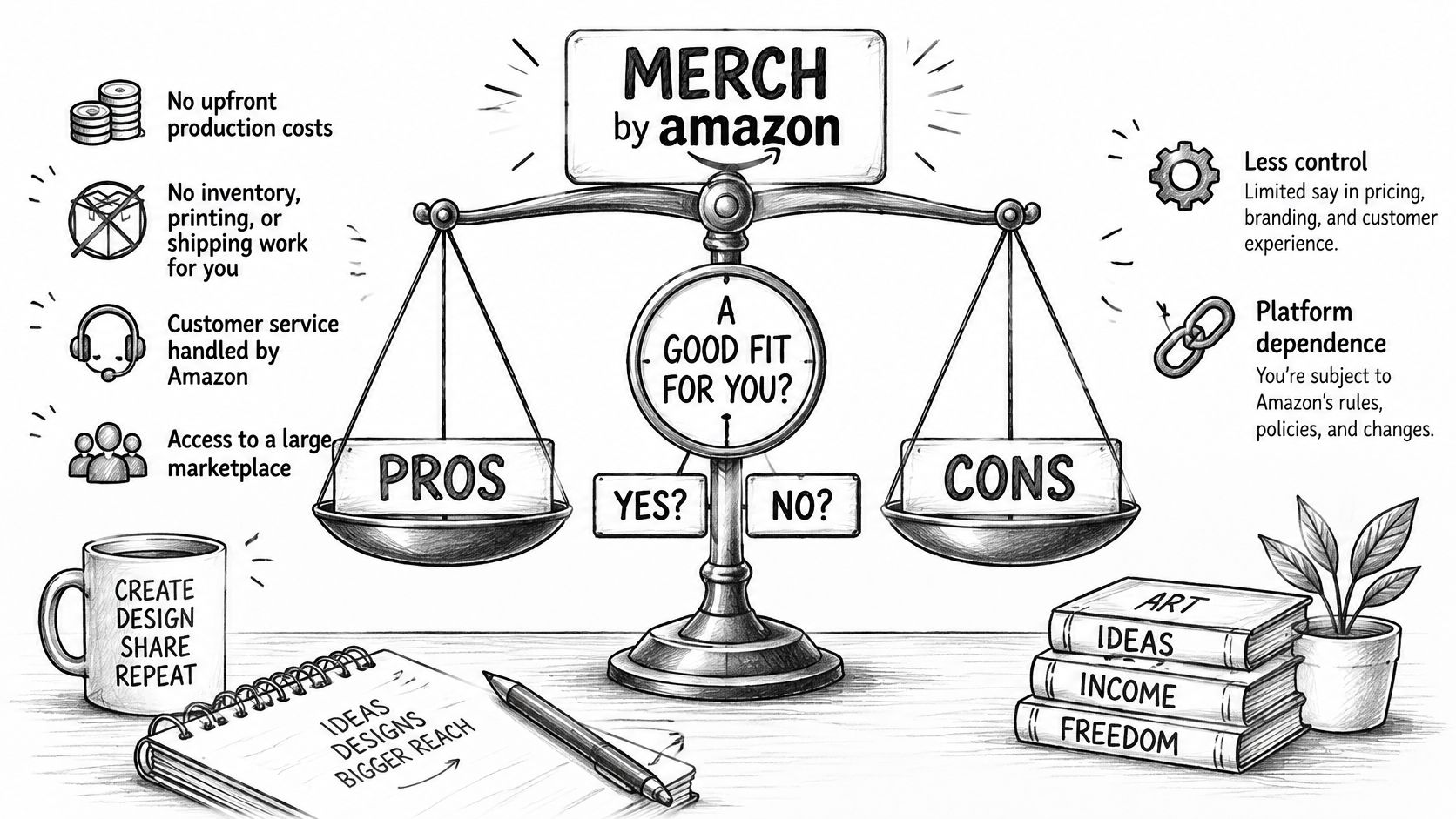
This model fits if you want Amazon to run production and support, and you're willing to live with less control. It doesn't fit if you need to own the unboxing, the shipping speed, or the store page.
What you gain is no upfront production cost, no inventory, and no printing or shipping work on your desk. Customer service sits with Amazon, and the listing sits inside a large marketplace.
What you give up is control over production and shipping. Higher royalty groups depend on traffic and sales volume. Content rules are strict, and a listing can come down without notice. You also have little say over the store experience compared with a shop you own.
A short fit check
- You have original designs or licensed art you can document. If you can't name the license, don't upload it.
- You can test niches in small batches and accept that a quiet month isn't a broken printer.
- You accept Amazon's production and support in exchange for less control over how the order feels.
I'm not a tax adviser. If you're outside the country where you want a company on the paperwork, reading about company formation in Ireland for non-residents from Chern & Co (RegisterCompany.ie) is a separate decision from whether the art is ready.
If the fit looks right, validate the niche and the trademark status first, then upload a first batch of three to five designs. Trendlytic is one option for niche research and trademark checks across several POD marketplaces. Compare its output with your own sales notes. This work rewards patience and documentation more than speed, and no part of it guarantees results.
Pick one niche, check it against trademark records, and upload that first test batch.
Trendlytic is a print-on-demand niche research tool for TeePublic, Amazon Merch, Redbubble, and Etsy, with a built-in USPTO trademark check you can run before a Merch by Amazon upload. It won't pick your art or promise a royalty group, but it can sit next to the phrase and trademark pass in this guide. If you want that comparison in one place, visit Trendlytic.