Print on Demand API Guide for POD Sellers

You've got Etsy, Redbubble, TeePublic, and Amazon Merch open, alongside fulfillment dashboards and a spreadsheet you don't quite trust. A buyer wants a shipping update, a shirt needs the correct size, and yesterday's design still hasn't reached another storefront. You're spending more attention moving information than making decisions.
I think that's the useful starting point for a print on demand API. It's not a shortcut to sales. It's a way to give software the repetitive handoffs, provided you also build a way to notice when those handoffs fail.
Table of Contents
- The Daily Tangle of Storefronts and Fulfillment
- What a Print on Demand API Actually Is
- A Realistic Order Pipeline From Cart to Delivery
- Integration Essentials Without the Boilerplate Hype
- Choosing a POD API Provider Without the Marketing Gloss
- The Quiet Half No One Talks About
- Where Trendlytic Fits Into an API Workflow
- When an API Is Worth the Build and When It Is Not
The Daily Tangle of Storefronts and Fulfillment
Suppose you're juggling those storefronts and checking Printful, Printify, and another fulfillment dashboard. You copy an address into an order, select a garment, attach artwork, and return to your spreadsheet to record what happened. Nothing about that hypothetical workflow is complicated on its own.
The trouble starts when you interrupt it. You answer a customer message halfway through, return to the wrong browser tab, and can't remember whether you submitted the order or merely saved it. A shipping update appears somewhere else, but the buyer still sees an old status.
Separate the workflows before connecting them
I wouldn't treat every tab as another version of the same store. A marketplace-hosted merchandise business and an Etsy shop connected to an external printer need different operational arrangements. Don't assume you can route every marketplace sale to whichever printer you prefer.
Before choosing an integration, write down the actual handoffs:
- Product publishing: Which system holds the approved artwork, listing text, and product options?
- Order submission: Who receives the paid order, and who authorizes production?
- Customer updates: Where does tracking originate, and who communicates it?
- Exception handling: Who investigates an order that appears in the storefront but not in fulfillment?
That last question is easy to overlook. Software can move a record without proving that the receiving system accepted everything you intended.
Practical rule: Automate a handoff only after you can describe what success and failure look like.
For me, the central promise isn't fewer browser tabs. It's a traceable path between a customer's purchase and the physical product they receive. An API helps establish that path, but your application still needs to decide what belongs on it.
What a Print on Demand API Actually Is
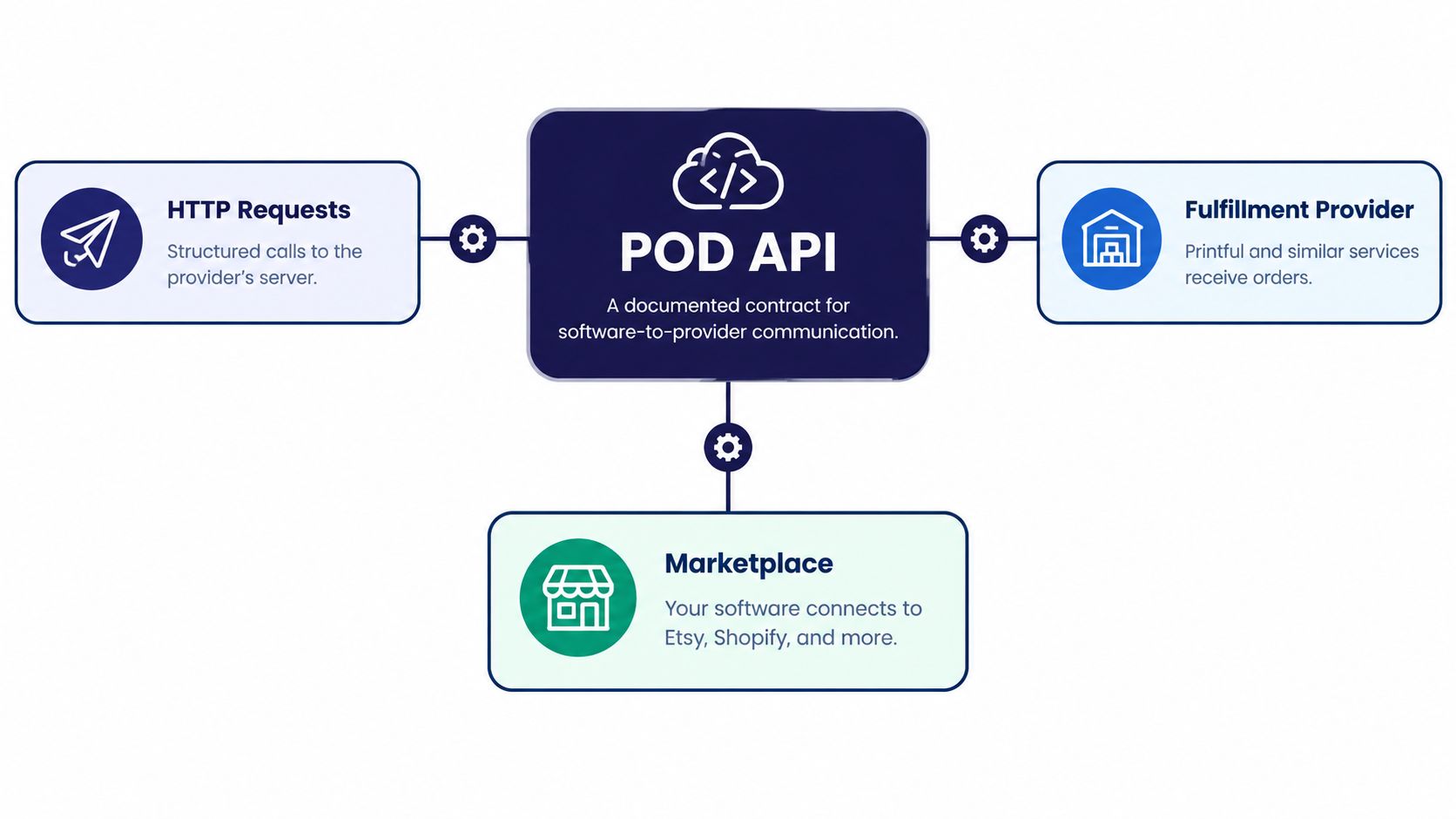
A print on demand API is a documented contract that lets your application exchange structured information with a fulfillment service. Instead of someone filling out a dashboard form, software sends a request and interprets the response.
Printful provides a useful reference shape. Its developer documentation describes a REST API using GET, POST, PUT, and DELETE, with functionality spanning catalogs, store products, files, mockups, orders, shipping rates, warehouse products, and webhooks. Its order functionality includes creation, confirmation, updates, and fulfillment management, alongside external order IDs, customized item names, and retail-price fields.
Read the reference by business task
I find API documentation easier to understand when I translate endpoint names into ordinary questions.
| Building block | Question your application needs to answer |
|---|---|
| Catalog and variants | What can I sell, in which size and color? |
| Files and mockups | Which artwork will print, and what preview represents it? |
| Store products | How does my listing connect to the provider's product? |
| Orders | What should be produced, and has production been authorized? |
| Shipping and webhooks | What delivery information can I retrieve or receive? |
A GET generally retrieves information. POST submits information or starts an operation, while PUT and DELETE handle documented update and removal operations. Always read the endpoint's own behavior rather than assuming the method tells you everything.
For a broader explanation of connecting separate applications, Wistec's guide to connecting your apps is a useful companion resource.
The important distinction is between request acceptance and business completion. Receiving an order identifier doesn't mean a shirt has been printed. Likewise, requesting a mockup doesn't mean the preview is ready for publication.
I'd also resist treating this reference shape as a universal specification. Another provider may organize variants differently or require a separate confirmation step. Recognizing the building blocks helps you work through the documentation, but it doesn't replace reading it.
A Realistic Order Pipeline From Cart to Delivery
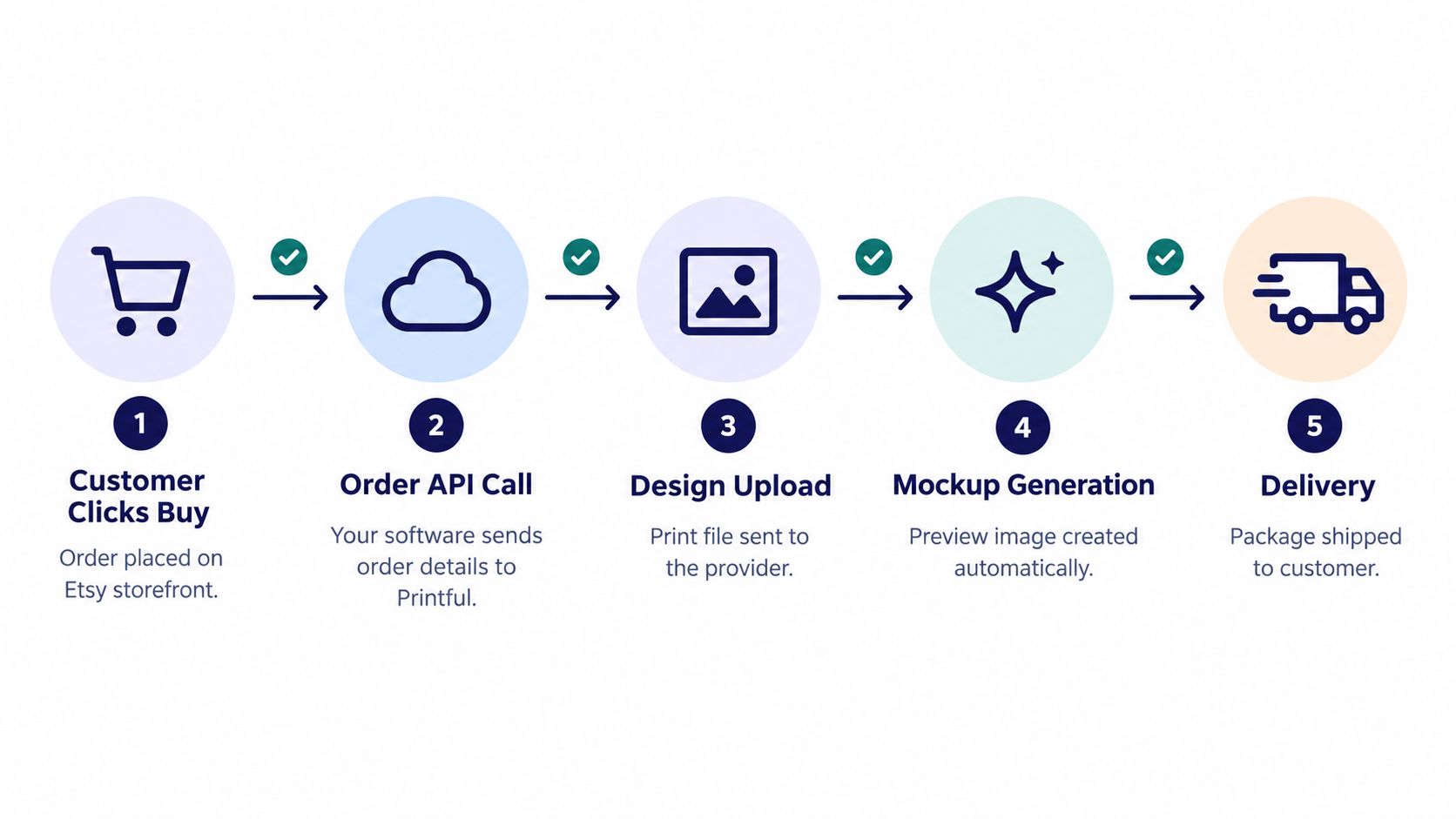
Consider a hypothetical Etsy order for a navy shirt in a medium size, printed with your original hiking illustration. I'd prepare the product before the customer buys, then let the order workflow reference those approved records.
The visual below summarizes the handoffs. Its sequence shouldn't be treated as a required implementation order: reusable print files and mockups usually belong in your preparation workflow, while personalized artwork may need preparation after purchase.
Prepare the product and preserve its identity
Your application retrieves the catalog option, uploads or references the approved design file, and requests a mockup. It then creates the marketplace listing through whatever publishing interface that marketplace permits.
The preparation record connects the listing option to the exact fulfillment variant and print file. "Navy medium" is a human-readable description, not a sufficient cross-system identifier.
Move the order through controlled transitions
- Receive the purchase: Use a supported order event or polling process. Verify payment eligibility and retrieve the complete order details.
- Build the fulfillment request: Resolve the stored variant mapping, delivery address, quantity, artwork reference, and any supported customization fields.
- Create and confirm: Submit the provider's order-creation request, store its response, and perform a separate confirmation operation if required.
- Track production and shipment: Process supported status callbacks or retrieve current status. Save tracking details when available, then update the buyer-facing system through its supported mechanism.
I'd store the storefront order reference alongside the provider order ID. Keep customer retail amounts separate from fulfillment charges, and check personalization against the actual print file rather than relying on an item name.
Shipping-label creation may happen inside the fulfillment service. Don't invent a label API call just because your application needs a tracking number, and don't interpret “shipped” as “delivered” without supporting delivery information.
The practical questions around destinations, shipping choices, and customer expectations belong in your logistics planning, not just your request payload. A technically valid order can still be a poor customer experience.
Integration Essentials Without the Boilerplate Hype
I'd start with a small backend worker, persistent order records, and a durable queue. Let the storefront-facing handler save incoming work promptly; let the worker perform fulfillment requests separately. That makes the workflow easier to inspect and recover than a chain of network calls inside a checkout request.
The examples below are pseudocode shapes, not provider-specific syntax. Authentication schemes, idempotency support, and webhook verification mechanisms must come from the documentation for the interface you're using.
Protect credentials and incoming events
- Authentication:
credentials = secret_store.load(tenant); client = authenticate(credentials). Keep API keys and OAuth tokens on the backend. Use only the permissions your workflow needs, and avoid logging secrets. - Webhook verification:
if not verify_as_documented(raw_body, headers): reject(). When signed callbacks are supported, verify them using the documented algorithm and original request body. Don't assume every provider supplies the same signature mechanism. - Durable receipt:
save_event(event); enqueue(event.reference); acknowledge(). Record the event before acknowledging it so a process restart doesn't erase accepted work.
OAuth adds authorization and token-lifecycle responsibilities. An API key may be simpler to operate, but simplicity doesn't remove the need to isolate client credentials.
Make retries deliberate
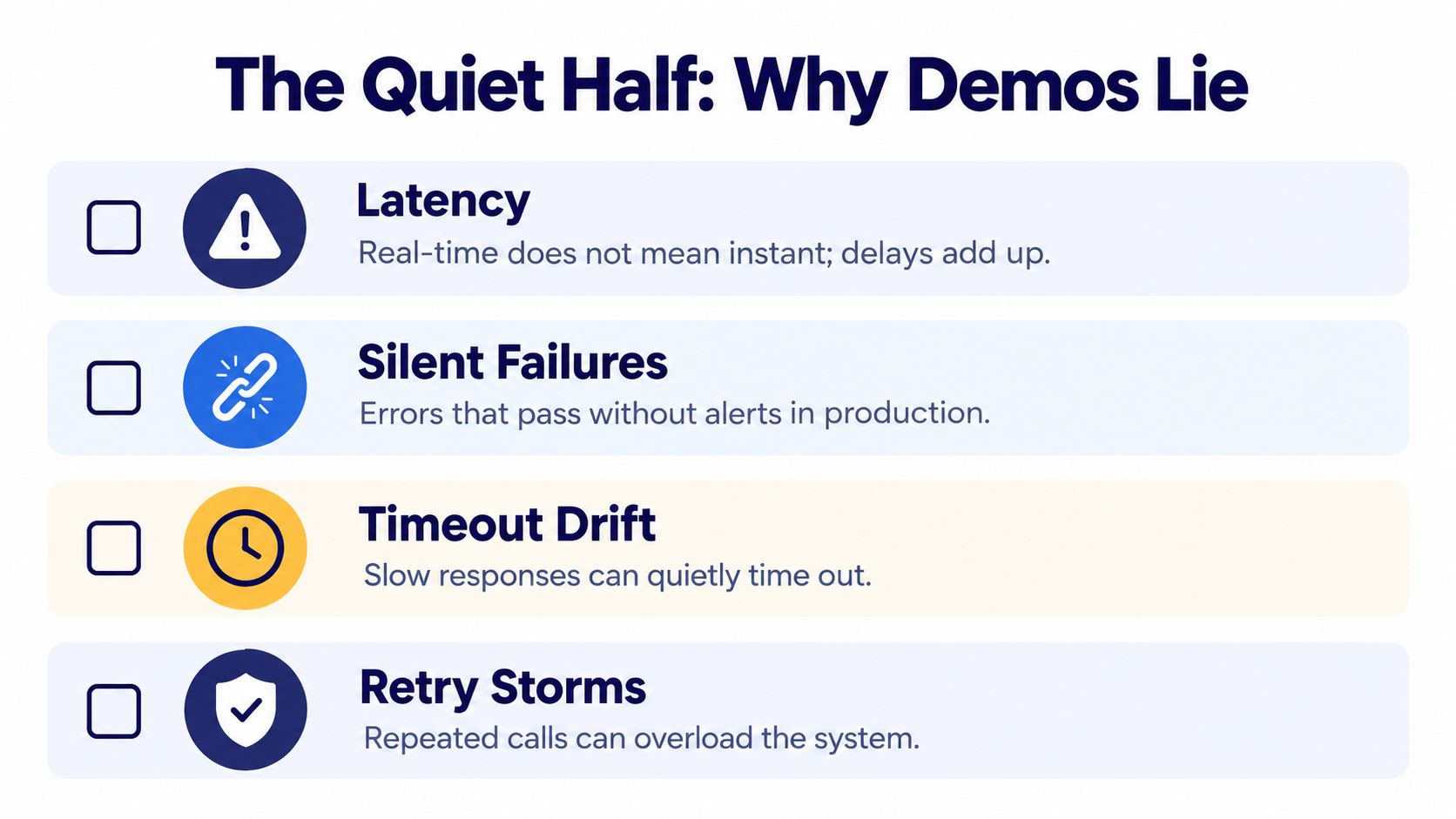
A timeout creates uncertainty: the provider may have created the order even though your worker never received the response.
Use a stable submission reference, such as submission_key = tenant + storefront_order_reference, and enforce uniqueness locally. If the provider supports idempotency keys, send that stable key through its documented mechanism; otherwise, check existing provider records before attempting an uncertain submission again.
For rate limiting, the shape is if rate_limited: schedule_after(provider_retry_delay). For eligible temporary server failures, use capped exponential backoff with jitter, then stop after your configured retry allowance.
A retry is a decision about an uncertain operation, not permission to submit the same purchase again.
Keep exhausted work in a dead-letter queue or table with the payload reference, error, attempt history, and recovery action. Invalid artwork or an unmapped variant should go to investigation, not endless retries.
I'd prioritize these safeguards before elaborate infrastructure. For broader architectural questions, Rite NRG's practical integration challenges for 2026 provides another perspective to consider alongside the provider documentation.
Choosing a POD API Provider Without the Marketing Gloss
I wouldn't choose a fulfillment provider from a catalog count alone. Your shortlist might include Printful, Printify, Gelato, Gooten, and SPOD, but each candidate needs checking against your actual products, destinations, access requirements, and recovery workflow.
Printful's API page reports more than 1 million items fulfilled per month, 584 customizable products, 22 integration partners, and 146.8 million items delivered since 2013. Those are useful scale benchmarks, not proof that a particular product will be available or suitable for your customer's destination.
POD API Providers Compared
The table separates documented benchmarks from questions you still need to verify. I'm not filling missing catalog or access details with guesses.
| Provider | Type | API openness | Catalog size | Notable constraints |
|---|---|---|---|---|
| Printful | Fulfillment | Documented REST interface | Reported benchmark above | Check endpoint behavior, product eligibility, and destination coverage |
| Printify | Fulfillment candidate | Verify current access and permissions | Verify current catalog | Confirm variant mapping, event coverage, and fulfillment routing |
| Gelato | Fulfillment candidate | Verify current access and permissions | Verify current catalog | Check production availability for your products and destinations |
| Gooten | Fulfillment candidate | Verify current access and permissions | Verify current catalog | Review onboarding, status events, and exception handling |
| SPOD | Fulfillment candidate | Verify current service and API availability | Verify current catalog | Confirm current offering, integrations, and regional eligibility |
| Etsy and Amazon Merch | Marketplaces, not interchangeable fulfillment APIs | Assess separately for each intended operation | Not directly comparable | Marketplace permissions, publishing rules, and seller economics differ |
Test the workflow you'll actually operate
Ask each candidate to demonstrate product lookup, order submission, a production exception, and shipment retrieval for your intended product. Check whether refund and cancellation events are available, rather than assuming “webhooks supported” means complete lifecycle coverage.
Regional footprint deserves the same precision. Ask where the specific product can be produced and shipped, not merely whether the provider describes its network as global.
For an agency, I'd give extra weight to credential separation, per-client workloads, and predictable quota management. For a smaller shop, a supported native integration may eliminate custom maintenance you don't need; this comparison of print on demand apps for Shopify can help frame that alternative.
My decision heuristic is straightforward: choose the provider whose documented workflow fits your operational needs and whose exceptions you can manage. Treat product breadth as a filter, not the final verdict.
The Quiet Half No One Talks About
A successful demonstration proves that a request worked under the conditions of that demonstration. It doesn't establish that your catalog will remain aligned or that every status change will reach your database.
The Pythias discussion of print-on-demand integration types identifies synchronization delays, storefront/provider variant mismatches, and incomplete marketplace lifecycle coverage as operational concerns. These are reasons to test publication readiness and recovery, not just successful submission.
Budget requests before adding stores
Etsy's rate-limit documentation describes queries-per-second and queries-per-day limits at the API-key level, a rolling 24-hour window, and HTTP 429 responses with a retry-after header. It also describes the enterprise tier introduced in 2025 for applications exceeding three million daily calls, with eligibility requiring an average of at least one million daily calls over a calendar year and pricing tied to API-attributed revenue or call volume.
The same documentation restricts each key to an application and prohibits circumventing limits. Don't treat additional keys as a quota workaround.
A useful planning formula is expected daily calls = routine synchronization + order processing + reconciliation + retry allowance. Estimate each component from your workflow, then reserve capacity for recovery.
Reconcile what events can't prove
- Publication readiness: Check that required product data and mockups are available before marking a listing ready.
- SKU integrity: Compare stored mappings with current provider variants and availability. Quarantine ambiguous matches.
- Missing updates: Retrieve unresolved orders periodically and compare provider records with local state.
- Controlled recovery: Apply the submission safeguards and dead-letter process already established, with per-client queue budgets.
Represent paid, submitted, in-production, shipped, refunded, and cancelled explicitly. Keep payment state separate from fulfillment state where necessary: a refund doesn't by itself prove production stopped.
I'd make these checks part of the quality assurance processes, including tests that deliberately withhold events. The useful question is whether you can detect disagreement, not whether your dashboard updates quickly.
Where Trendlytic Fits Into an API Workflow
Research belongs before the production pipeline. I'd keep the research handoff separate from publishing so an interesting keyword can't automatically become an approved listing.
The integration needs a reviewed product record, not an unfiltered collection of search results. That record should distinguish inspiration, original artwork, proposed listing metadata, rights-review status, and the product you intend to fulfill.

Make approval part of the handoff
- Metadata preparation: Review proposed titles and tags for relevance and marketplace requirements before passing them to a publishing adapter.
- Artwork ownership: Use competitor images for research, not as downloadable print files for your own products.
- Rights review: Route trademark flags to human review and block publication while unresolved. A clear screening result isn't legal clearance.
- Production readiness: Attach your original, approved artwork and the chosen variant mapping before allowing submission.
Structured research can reduce retyping, but it shouldn't remove editorial judgment. I'd also preserve where a proposed keyword came from and who approved the final listing.
Compare net earnings, not displayed prices
Redbubble's payment calculation charges Standard accounts 50% of monthly earnings, Premium accounts 20%, and Pro accounts 0%, only when sales occur, with an account-fee cap of $150, €150, or £150 per month. It also applies an excess-markup fee above 20% markup, charging Standard and Premium accounts 50% of earnings from that excess, while Pro accounts pay none.
That makes a displayed retail price an incomplete input for a pricing decision. Keep expected artist earnings separate from an external printer's fulfillment margin, and apply the relevant platform rules rather than reusing a universal profit calculation.
A clean research handoff gives your application reviewed inputs. It doesn't guarantee demand, rights clearance, or a profitable selling price.
When an API Is Worth the Build and When It Is Not
I'd build a custom integration when repeated operational problems justify owning software. Multiple connected storefronts, frequent catalog changes, personalized products, and agency-managed workflows can make that investment sensible.
I'd hesitate when a supported native app already handles the important work, or when manual review remains manageable. A CSV handoff, where supported, can be a reasonable middle ground. There's no universal build-time estimate because publishing permissions, customization requirements, and recovery expectations change the scope.
Match the workflow to the burden
| Workflow | When I'd consider it | What you still own |
|---|---|---|
| Manual dashboard | Low operational complexity and close review | Accurate entry and status checks |
| CSV import or export | Supported batch work without continuous synchronization | File validation and import review |
| Native integration | Standard storefront-to-provider workflow | Configuration and exception oversight |
| Custom API | Specialized routing, customization, or multi-store coordination | Code, monitoring, credentials, and recovery |
The cost continues after launch. Someone must investigate stuck orders, maintain mappings, respond to interface changes, and decide whether an exception should be retried or cancelled.
Check economics and rights before automating publication
Amazon's official Merch on Demand information states that royalties come from the offer price after applicable tax and Amazon's costs. It also requires submitted content to comply with its content policies, community guidelines, applicable law, and intellectual-property rules.
I'd therefore treat trademark and rights screening as a publishing prerequisite, not an optional cleanup task. Automation shouldn't make an unreviewed design easier to distribute.
Start with the smallest workflow that solves a real problem. Prove that you can detect and recover from a failed handoff before expanding it, and keep research decisions separate from production authorization.
I'd use Trendlytic for the research step before choosing a manual, native-app, or API workflow. It covers TeePublic, Amazon Merch, Redbubble, and Etsy, with a built-in USPTO trademark check to support your review. Visit Trendlytic to explore a niche, then carry only your reviewed metadata and original artwork into the publishing process you choose.